
DDAS Application Template Manuals
|
Application Template__ |
|
|
|
Software Manual |
EN |
|
|
|
|
|
|
DDAS Application Template Manuals
|
Application Template__ |
|
|
|
Software Manual |
EN |
|
|
|
|
|
|
3 Application Template Step-by-Step
Here you will find information about this documentation.
|
|
Read the operating instructions of the hardware devices before starting the software's installation!
|
|
|
Note!
This the software manuals describe the DDAS » Application Template«. It is intended for software developers of machine manufacturers who integrate, validate, and operate the library function blocks within CODESYS-based applications.
|
|
|
Tip!
Further information can be found under: https://www.ddas.digital
|
This manual is part of a library collection and refers to the following manuals:
|
Documentation |
Subject |
|
DDAS LicenseManager Library Manual |
Description and usage of the library license management function blocks |
|
DDAS DateTime Library Manual |
Description and usage of the library date time function block. |
|
DDAS Scheduler Library Manual |
Description and usage of the library scheduler function block. |
|
DDAS EquipmentPerformance Library Manual |
Description and usage of the library Equipment Performance function block. |
|
Version |
Description |
||
|
1.0 |
08.05.2026 |
DDAS |
Initial version |
|
|
|
|
|
|
|
|
|
|
|
|
|
|
|
This manual describes the use of an application template designed to simplify the implementation of DDAS function blocks during commissioning.
The application template can be used in the following ways:
· Integration into an existing machine program
· Deployment on an external device as an independent PLC application
In both cases, the application template provides a defined interface consisting of input and output variables.
From an implementation perspective, there are generally no differences between the two approaches. Therefore, these options are not described separately in this document, as the communication method to be used is not predefined and may vary depending on the application.
The input variables must be assigned either:
The output variables are directly assigned by the function blocks via the application template. The resulting output information can then be used as required by the machine program or a machine visualization.
The application template already includes all required function blocks, which are executed in their logical sequence. All input and output variables are assigned through global variable lists.
For testing purposes, the template also includes a small example machine program and corresponding visualizations. It can be executed as an independent PLC application in demo mode without a valid license.
These components are intended solely for testing and commissioning purposes and are not required for use in a real machine application. They must be removed or excluded in the final implementation.
The application template and the associated libraries are CODESYS-based software modules developed using the CODESYS Engineering Tools (Version 3.5).
The software is compatible with CODESYS based Engineering Tools and can be used and integrated within existing PLC machine programs.
They are designed to run on compatible CODESYS runtime systems, such as the CODESYS Control Win V3 x64 runtime.
The use of persistent variables is optional; however, it is required if historical data needs to be retained.
The application template and its function blocks must be called cyclically within the user application or machine program to ensure proper operation.
For further information, please refer to the “Assumptions & Limitations” section in the library manual.
The libraries utilize a dedicated licensing mechanism. The standard CODESYS licensing model is not applicable to this software. Further details are provided in the “Licensing Concept” chapter below.
Note: It is the user’s responsibility to test and validate the application template and all associated function blocks for the specific configuration prior to use in a production environment.
The demo visualizations may behave differently depending on the tools and runtime environment, for example in terms of variable display formats, fonts, scaling behaviour, and real/date-time representation.
These visualizations are intended solely for demonstration purposes to provide a better understanding of how the function blocks operate and what information they provide. They are not required for a real machine application or for the operation of any library function block.
All libraries require a valid license. Each license is based on three mandatory keys:
License Activation Mechanism
To
activate a library license, one instance of the function block Get_Lib_License must be
called for each licensed library.
This function block is part of the DDAS_LicenseManager_Lib
library.
Licensing Process
The following steps are required to license and use a library:
The following chapters provide a step-by-step guide on how to use the application template to test all function blocks and integrate them into an existing machine application. Alternatively, the template can be operated as a standalone application on an external controller or device, such as an edge device.
The application template is divided into three main sections:
An additional section of the application template includes the standard PLC_PRG program, a version file, and the task configuration. These are standard modules present in every program (with the version file being optional) and are therefore not described further in this document.
The Library Function Block section (see graphic below) contains an AppSample folder as well as visualization examples for the respective library function blocks. These examples are intended to support understanding and demonstrate the use of the individual function blocks.

The image above shows the program structure of the application template.
Each library is organized in its own folder, following a consistent structure:
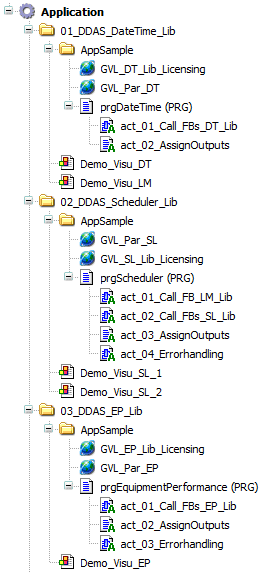
The sample image above illustrates the library function block program structure of the application template. Depending on the number of libraries included, the structure may vary in size and complexity.
In general,
these application program components can be directly copied without
modification into any user machine program when integrating the application
template into an existing program. The subprogram “xx_AssignOutput” can be
modified or extended if additional function block outputs need to be included.
The machine
interface contains two global variable lists:
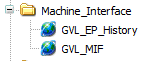
The image above shows the machine interface program structure of the application template.
The number of required input variables is reduced to the minimum necessary.
The output variables provide a selection of useful information for dashboarding and statistical analysis. However, the output interface can be adapted or extended as needed.
This section provides a sample user machine program that demonstrates how to handle the library function block machine interface. It illustrates what needs to be implemented in a user machine program to correctly interface with the library function blocks.
When using the application template on an external device, this section should either be removed or deactivated by not calling the program “prg_MachineProgram” from the PLC_PRG program.
However, the global variable list “GVL_Lib_Licensing” can still be used to assign the site and activation codes for all libraries within the application template.
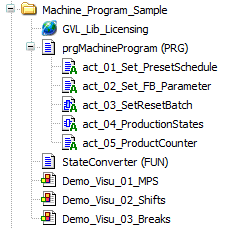
The image above shows a sample and minimised user machine program structure of the application template.
The program “prgMaschineProgram” demonstrates the coding required in a user machine program in conjunction with the “StateConverter” function.
· The program action “ProductCounter” generates virtual product counts required for the demonstration of operation of the library function blocks. It must be replaced with actual machine product counters in a real application.
The demo visualization “xx_MPS” is designed to demonstrate the handling of the machine interface, the operation of all function blocks, and the relevant machine interface inputs and outputs.
Via the “xEnableDemo” Button the sample machine program and the visualisation can be activated.
A batch can be easily started and stopped using the provided Start/Stop control. During operation, products are generated, and the batch end time is calculated based on the active production schedule. In addition, overall equipment performance and downtime KPIs are evaluated.

The image above shows the visualization “xx_MPS” in monitor mode.
Additionally, events such as breaks, downtime, or scrap parts can be simulated using the controls provided in the user interface.
Using the visualization is the fastest way to execute all provided library function blocks and to understand the basic operation of the machine interface by observing the relevant outputs generated by the individual function blocks.
Note: This visualization displays only a subset of the available information. Additional output data can be accessed in the library sample visualizations or within the output structures of the function blocks assigned to the global variable lists.
Attention: Activating the sample machine program will overwrite global variables in the machine interface global variable list (GVL_MIF). If the application template is used in a production machine, this sample program must be removed or disabled. Otherwise, it may cause unexpected issues within the function block interface.
The additional visualization “xx_Shifts” and “xx_Breaks” visualized the actual shift and break schedule.
All library licenses can be assigned in the global variable list “GVL_Lib_Licensing”. A valid site and activation code must be provided for operation in a production machine.
For testing the application template, a license is not required. Without a valid license, all library function blocks operate without limitations for up to two hours after runtime start. This period is sufficient to validate the results of each function block and assess their relevance for the user’s application.

The image above shows a sample of the global variable list “GVL_Lib_Licensing”.
|
|
These instructions have been prepared to the best of our knowledge and belief to provide you with the highest possible level of support when working with our product.
Despite our best efforts, we may not always fully achieve this objective. If you identify any issues or have suggestions for improvement, we would greatly appreciate your feedback.
Please send your comments or criticism in a short e‑mail to:
Thank you for your support.
Your DDAS Application Software Team |


