
DDAS Library Manuals
|
DateTime Library__ |
|
|
|
Software Manual |
EN |
|
|
|
|
|
|
DDAS Library Manuals
|
DateTime Library__ |
|
|
|
Software Manual |
EN |
|
|
|
|
|
|
3.4.0 Function block Inputs and Outputs
3.5 Execution & Timing Behaviour
3.6 Error Handling & Diagnostics
Here you will find information about this documentation.
|
|
Read the operating instructions of the hardware devices before starting the software's installation!
|
|
|
Note!
This the software manuals describe the DDAS »DateTime« Library. It is intended for software developers of machine manufacturers who integrate, validate, and operate the library function blocks within CODESYS-based applications.
|
|
|
Tip!
Further information can be found under: https://www.ddas.digital
|
This manual is part of a library collection and refers to the following manuals:
|
Documentation |
Subject |
|
DDAS LicenseManager Library Manual |
Description and usage of the library license management function blocks |
|
|
|
|
Version |
Description |
||
|
1.0 |
14.04.2026 |
DDAS |
Initial version |
|
|
|
|
|
|
|
|
|
|
|
|
|
|
|
This library provides function blocks for retrieving local and UTC date and time information. It is intended for applications that require reliable and consistent time data, such as data logging, event time stamping, and system-wide time synchronization.
The library supplies local time, UTC time, and a UTC-based timestamp with millisecond resolution in predefined, standardized formats.
The library includes the following user function block:
Detailed descriptions of the function blocks and their relevant dependencies are provided in the following chapters.
All libraries require a valid license. Each license is based on three mandatory keys:
License Activation Mechanism
To
activate a library license, one instance of the function block Get_Lib_License must be
called for each licensed library.
This function block is part of the DDAS_LicenseManager_Lib
library.
Licensing Process
The following steps are required to license and use a library:
Note: Detailed information on how to use the function block Get_Lib_License is provided in the software manual of the library DDAS_LicenseManager_Lib.
Note: The function Get_sError is available in every library and provides access to the error description and enumeration corresponding to a function block’s error code, when required.
This chapter describes the function block GetDateTimeInfo.
Function Block Name: GetDateTimeInfo
Library: DDAS_DateTime_Lib
Dependent Codesys libraries: SysTime | SysTimeRtc | Util
CODESYS Version Compatibility: CODESYS V3.5 and higher
License / Usage Restrictions: Requires valid full or demo library license
The GetDateTimeInfo
function block provides consistent access to local time, UTC time,
and a UTC-based timestamp in milliseconds or seconds.
It is designed for applications where synchronized and comparable time
information
is required across different systems or devices.
· Event and alarm time stamping
· Production data logging
· Time synchronization reference for distributed control systems
· HMI display of local and UTC time
When enabled, the function block GetDateTimeInfo periodically retrieves the current system’s time.
It outputs:
- Local date and time
- Day of week
- Structured date and time details
- Optional millisecond-accurate UTC timestamp
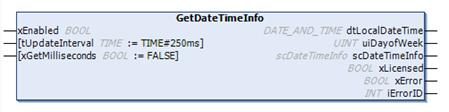
The update interval is
configurable within a range of 0 to 1 second.
The update interval shall be selected according to application needs. Short intervals increase accuracy but may increase system load
The
function block uses CODESYS system time and real-time clock services to
retrieve both local and UTC date/time information.
Error states are monitored continuously and reported via diagnostic outputs.
|
Scope |
Name |
Type |
Initial |
Comment |
|
Input |
xEnabled |
BOOL |
Enables execution of the function block when TRUE. |
|
|
tUpdateInterval |
TIME |
TIME#250ms |
Time base that defines how often date and time information is updated (e.g. T#250ms updates the date and time every 250 ms). The time base is limited to T#1s. |
|
|
xGetMilliseconds |
BOOL |
FALSE |
When set to TRUE, time is provided in milliseconds; otherwise, time is provided in seconds. |
|
|
Output |
dtLocalDateTime |
DT |
Local Date and Time. |
|
|
UINT |
Local day of the week, where 1 = Monday and 7 = Sunday. A value of 0 indicates an unknown weekday. |
|||
|
scDateTimeInfo |
Detail information about Date and Time. |
|||
|
xLicensed |
BOOL |
TRUE when a valid full or demo library license is active. |
||
|
xError |
BOOL |
TRUE if an error or warning is detected. Detailed error information is provided in iErrorID. |
||
|
INT |
Error and status identifier for diagnostics. |
This structure provides UTC and local date and time in various formats, as well as the current day of the week and calendar week.
|
Name |
Type |
Comment |
|
sLocalDateTime |
STRING |
Local Date and Time string. |
|
dLocalDate |
DATE |
Local Date. |
|
todLocalTIME |
TOD |
Local Time in time of day format. |
|
uli_UTC_Timestamp |
ULINT |
Unix UTC Timestamp. |
|
dtUTC_DateTime |
DT |
UTC Date and Time. |
|
sUTCDateTime |
STRING |
UTC Date and Time string. |
|
dUTC_Date |
DATE |
Date of UTC Time. |
|
todUTC_Time |
TOD |
UTC Time in time of day format. |
|
eDayofWeek |
Local Day of the week. |
|
|
tTimeZoneDiff |
TIME |
Time difference between Local and UTC Time. |
|
ui_cw |
UINT |
Local Calendar week. |
Day of the week enumeration.
|
Name |
Initial |
Comment |
|
Unknown |
0 |
Unknown day of the week. |
|
Monday |
1 |
Week day Monday. |
|
Tuesday |
2 |
Week day Tuesday. |
|
Wednesday |
3 |
Week day Wednesday. |
|
Thursday |
4 |
Week day Thursday. |
|
Friday |
5 |
Week day Friday. |
|
Saturday |
6 |
Week day Saturday. |
|
Sunday |
7 |
Week day Sunday. |
Library Possible Error Codes and Descriptions.
|
Name |
Initial |
Comment |
|
no_error |
0 |
No error detected. |
|
no_ValidLicense |
10 |
No valid license was found. Please verify the library license using DDAS_LM.Get_Lib_License. |
|
invalid_GetTimeBase |
20 |
The input parameter tGetDateTimeDuration is greater than T#1s, the time base is limited to T#1s (maximum update interval). |
|
invalid_LocalDateTime |
21 |
Invalid dtLocalDateTime = DT#1970-01-01-00:00:00 |
|
invalid_UTC_DateTime |
22 |
Invalid dtUTC_DateTime = DT#1970-01-01-00:00:00 |
|
invalid_eDayofWeek |
23 |
Invalid week day eDayofWeek = 0 or eDayofWeek > 7 |
|
invalid_ui_cw |
24 |
Invalid calender week ui_cw = 0 or ui_cw > 53 |
|
unknowing_error |
99 |
Unknowing error |
Note: The library function Get_eError can be used to determine the corresponding eError enumeration based on a given integer iErrorID.
This Global Variable List provides the library license GUID. Relevant input parameter for the function block DDAS_LM.Get_Lib_License, required to activate the library license in conjunction with the activation key and side code.
|
Scope |
Name |
Type |
Initial |
Comment |
|
Constant |
cLibraryGuid |
STRING |
‘{LIB-DDAS-D5BA612E}’ |
Unique Library license GUID for use in the user program to activate the library license. |
The function block is intended to be executed cyclically in a task context.
Timing precision depends on the configured task cycle time and target platform
If an internal error, a library issue, or a licensing problem occurs, xError is set to TRUE and iErrorID provides the corresponding error code. Detailed descriptions of the error codes are defined in the enumeration eError.
Accuracy depends on the system clock and the RTC configuration. Hardware‑dependent behavior may vary across different CODESYS platforms.
Before ordering this library, please verify the correct functionality of the library function block in your target system.
Declaration and Call of the Function Block GetDateTimeInfo:
VAR
fb_GetDateTime : DDAS_DT.GetDateTimeInfo;
END_VAR
FB call in structure text:
fb_GetDateTime(
xEnabled := TRUE,
tUpdateInterval := T#250MS,
xGetMilliseconds := TRUE
);
FB call in continuous function chart diagram:
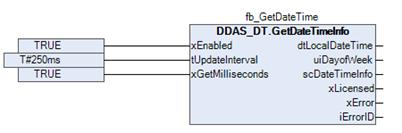
Function block sample input and output parameter:
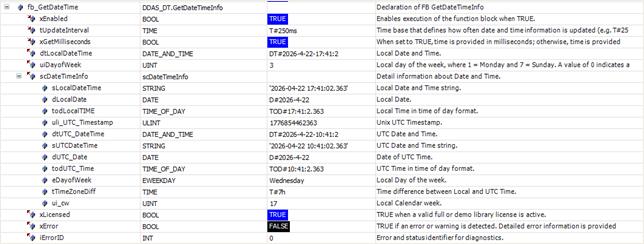
Screenshot example in Online / Monitor mode
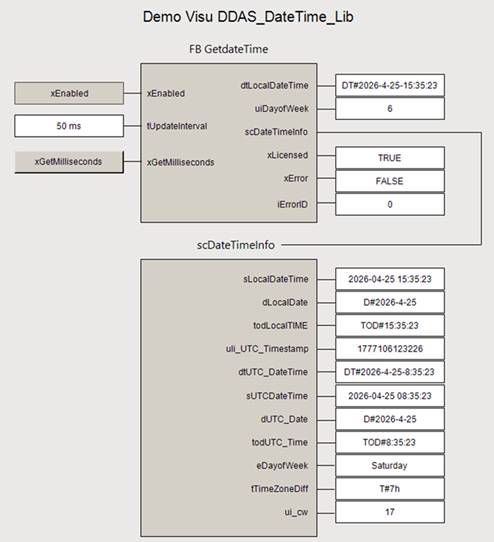
Demo Visualisation
|
|
These instructions have been prepared to the best of our knowledge and belief to provide you with the highest possible level of support when working with our product.
Despite our best efforts, we may not always fully achieve this objective. If you identify any issues or have suggestions for improvement, we would greatly appreciate your feedback.
Please send your comments or criticism in a short e‑mail to:
Thank you for your support.
Your DDAS Application Software Team |


