
DDAS Library Manuals
|
Scheduler Library__ |
|
|
|
Software Manual |
EN |
|
|
|
|
|
|
DDAS Library Manuals
|
Scheduler Library__ |
|
|
|
Software Manual |
EN |
|
|
|
|
|
|
3.4.0 Function block Inputs and Outputs
3.5 Execution & Timing Behaviour
3.6 Error Handling & Diagnostics
4.4.0 Function block Inputs and Outputs
4.5 Execution & Timing Behaviour
4.6 Error Handling & Diagnostics
5.6.0 Function block Inputs and Outputs
5.7 Execution & Timing Behaviour
5.8 Error Handling & Diagnostics
6.4.0 Function block Inputs and Outputs
6.5 Execution & Timing Behaviour
6.6 Error Handling & Diagnostics
Here you will find information about this documentation.
|
|
Read the operating instructions of the hardware devices before starting the software's installation!
|
|
|
Note!
This the software manuals describe the DDAS »Scheduler« Library. It is intended for software developers of machine manufacturers who integrate, validate, and operate the library function blocks within CODESYS-based applications.
|
|
|
Tip!
Further information can be found under: https://www.ddas.digital
|
This manual is part of a library collection and refers to the following manuals:
|
Documentation |
Subject |
|
DDAS LicenseManager Library Manual |
Description and usage of the library license management function blocks |
|
DDAS DateTime Library Manual |
Description and usage of the GetDateTime function block. |
|
|
|
|
Version |
Description |
||
|
1.0 |
14.04.2026 |
DDAS |
Initial version |
|
|
|
|
|
|
|
|
|
|
|
|
|
|
|
This library support batch‑oriented manufacturing by calculating required production time, estimating batch completion while considering production and break schedules, and providing real‑time and historical information about active schedules.
They use product targets and actual machine performance to enable accurate time estimation, schedule awareness, and event triggering.
The provided data supports operator displays, production planning, synchronization of automation logic, scheduling of downstream processes, and proper handling of shifts and breaks.
The library includes the following user function blocks:
GetBuildTime
Calculates the total production time required to complete all target products based on actual machine performance. It provides a pure build-time estimate without considering schedules or breaks, supporting production planning, operator displays, and downstream process coordination.
GetBatchScheduledEndTime
Estimates the expected batch end time by combining calculated build time with configured production schedules and planned breaks. It enables realistic batch completion forecasts for planning, scheduling, and triggering follow‑up automation actions.
GetSchedule
Provides real‑time and historical information about the currently active production or break schedule, including timing, duration, and start/end trigger signals. It supports schedule monitoring, synchronization of production logic, operator visualization, and correct handling of shifts and breaks in automated systems.
UpdateInterval
Controls the update rate of date and time outputs by applying a configurable interval filter, ensuring that values are refreshed only when necessary. It is designed to reduce unnecessary high-frequency updates, improving readability and usability for operator displays.
Detailed
descriptions of the function blocks and their relevant dependencies are
provided in the following chapters.
All libraries require a valid license. Each license is based on three mandatory keys:
License Activation Mechanism
To
activate a library license, one instance of the function block Get_Lib_License must be
called for each licensed library.
This function block is part of the DDAS_LicenseManager_Lib
library.
Licensing Process
The following steps are required to license and use a library:
Note: Detailed information on how to use the function block Get_Lib_License is provided in the software manual of the library DDAS_LicenseManager_Lib.
Note: The function Get_sError is available in every library and provides access to the error description and enumeration corresponding to a function block’s error code, when required.
This chapter describes the function block GetBuildTime.
Function Block Name: GetBuildTime
Library: DDAS_Scheduler_Lib
Dependent Codesys libraries: Util
CODESYS Version Compatibility: CODESYS V3.5 and higher
License / Usage Restrictions: Requires valid full or demo library license
This function block GetbuidTime calculates the remaining time required to complete a production batch based on defined target quantities and actual machine performance
This function block is
typically used in batch-oriented manufacturing applications to calculate the
build time required to complete all products. The calculation is based on
defined product targets and actual machine performance and does not consider
production schedules or breaks.
The resulting information can be used for operator displays, production planning, scheduling of downstream processes, or triggering subsequent automation steps.
When enabled, the GetBuildTime function block executes its calculation cyclically and uses the current local date and time internally.
The calculation is based on the planned product target, the number of products already produced, the machine’s nominal throughput, and the effective performance derived from the OEE value.
Production schedules, breaks, and shift models are not considered.
The result provides a precise time‑to‑completion value and indicates when the batch target has been reached or exceeded.
Additional status outputs support license verification and diagnostic handling.
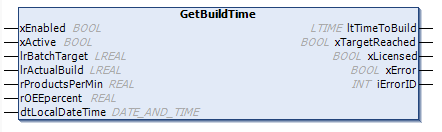
Key inputs include:
Key outputs include:
|
Scope |
Name |
Type |
Initial |
Comment |
|
Input |
xEnabled |
BOOL |
Enables execution of the function block when TRUE. |
|
|
xActive |
BOOL |
Starts the build time calculation for the current batch. |
||
|
lrBatchTarget |
LREAL |
Planned number of products to be produced for the current batch. |
||
|
lrActualBuild |
LREAL |
Number of products already built. Must be 0 if production has not started. |
||
|
rProductsPerMin |
REAL |
Planned machine performance in products per minute. Valid range: 0.001 … 10000. |
||
|
rOEEpercent |
REAL |
Actual or average Overall Equipment Effectiveness (OEE). Expected range: > 0.1 … 100.0. A value of 0 is interpreted as 100%. Maximum accepted value is 999%. |
||
|
dtLocalDateTime |
DT |
Current local date and time used internal as calculation. |
||
|
Output |
ltTimeToBuild |
LTIME |
The calculated remaining build time until the batch target is reached based on defined product targets and machine performance. |
|
|
xTargetReached |
BOOL |
TRUE when the batch target quantity has been reached or exceeded. |
||
|
xLicensed |
BOOL |
TRUE when a valid full or demo library license is active. |
||
|
xError |
BOOL |
TRUE if an error or warning is detected. Detailed error information is provided in iErrorID. |
||
|
INT |
Error and status identifier for diagnostics. |
The function block is intended to be executed cyclically in a task context.
Timing precision depends on the configured task cycle time and target platform
If an internal error, a library issue, or a licensing problem occurs, xError is set to TRUE and iErrorID provides the corresponding error code. Detailed descriptions of the error codes are defined in the enumeration eError.
Accuracy depends on the system clock. Hardware‑dependent behavior may vary across different CODESYS platforms.
The build time calculation is restricted to a 49-day window. If the required build time extends beyond this period, the function block cannot provide a valid result.
Before ordering this library, please verify the correct functionality of the library function block in your target system.
Declaration and Call of the Function Block GetBuildTime:
GVL_Par:
VAR_GLOBAL
|
xExternActiveBatch |
: BOOL; |
//If TRUE a non-scheduled batch schedule is active, is FALSE schedule ends |
|
lrBatchTarget |
: LREAL := 5000; |
// Planned Target for the actual batch run |
|
lrActualBuild |
: LREAL; |
// Actual build products, if no parts are made it is zero (0) |
|
rProductsPerMin |
: REAL := 60; |
// Planned Machine Performance in products per min. (valid value between >= 0.001 and <= 10000) |
|
rOEEpercent |
: REAL := 90; |
// Actual or average OEE in percent e.g 80.5% (expected value between > 0.1 and <= 100 %, Limit 999%), 0% will be set to 100% |
|
dtLocalDateTime |
: DT; |
// Local Date and Time |
END_VAR
VAR
fb_GetBuildTime : DDAS_SL.GetBuildTime;
END_VAR
FB call in structure text:
fb_ GetBuildTime(
xEnabled := TRUE,
xActive := GVL_Par. xExternActiveBatch,
lrBatchTarget := GVL_Par. lrBatchTarget,
lrActualBuild := GVL_Par. lrActualBuild,
rProductsPerMin := GVL_Par. rProductsPerMin,
rOEEpercent := GVL_Par. rOEEpercent,
dtLocalDateTime := GVL_Par. dtLocalDateTime
);
FB call in continuous function chart diagram:
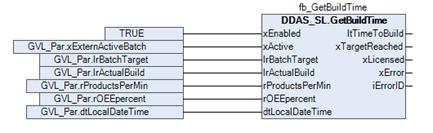
Function block sample input and output parameter:
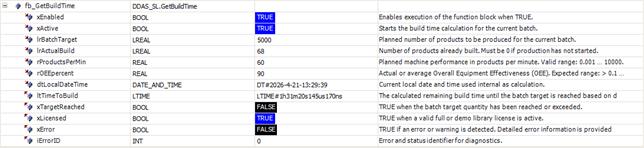
Screenshot example in Online / Monitor mode
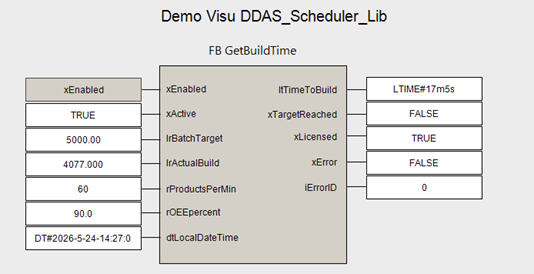
Demo Visualisation
This chapter describes the function block GetBatchScheduledEndTime.
Function Block Name: GetBatchScheduledEndTime
Library: DDAS_Scheduler_Lib
Dependent Codesys libraries: Util
CODESYS Version Compatibility: CODESYS V3.5 and higher
License / Usage Restrictions: Requires valid full or demo library license
This function block GetBatchScheduledEndTime estimates the batch end time based on the calculated batch build time and the configured production and break schedules.
This function block is
typically used in batch-oriented manufacturing applications where the batch end
time must be estimated while considering production schedules and planned
breaks. The estimation is based on defined product targets, actual machine performance,
and the calculated build time.
The calculated batch end time can be used for operator displays, production planning, scheduling of downstream processes, or triggering subsequent automation steps.
When enabled, the GetBatchScheduledEndTime function block estimates the expected batch end date and time based on the remaining build time and the configured production and break schedules.
The calculation uses the current local date and time, the active weekday, and the user‑defined shift and break configuration. The estimation is based on the provided remaining build time, which reflects defined product targets and actual machine performance.
Unlike pure build‑time calculations, this function block considers production schedules and planned breaks to determine a realistic batch end time.
The result provides the calculated batch end date and time, the total remaining time until batch completion, and the accumulated scheduled break time within this period. Additional status outputs indicate calculation validity, license status, and diagnostic information.
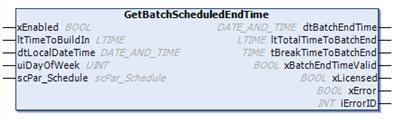
Key inputs include:
Key outputs include:
.
|
Scope |
Name |
Type |
Comment |
|
Input |
xEnabled |
BOOL |
Enables execution of the function block when TRUE. |
|
ltTimeToBuildIn |
LTIME |
The calculated remaining build time until the batch target is reached based on defined product targets and machine performance. |
|
|
dtLocalDateTime |
DT |
Current local date and time used internal as calculation. |
|
|
uiDayOfWeek |
UINT |
Local day of the week, where 1 = Monday and 7 = Sunday. A value of 0 indicates an unknown weekday. |
|
|
InOut |
scPar_Schedule |
User‑configured shift and break schedule |
|
|
Output |
dtBatchEndTime |
DT |
Estimated batch end time based on the calculated batch build time and the configured production and break schedules. |
|
ltTotalTimeToBatchEnd |
LTIME |
Total time remaining until batch end. |
|
|
tBreakTimeToBatchEnd |
TIME |
Total scheduled break time until batch end. |
|
|
xBatchEndTimeValid |
BOOL |
The batch end date and time has been calculated successfully and is valid. |
|
|
xLicensed |
BOOL |
TRUE when a valid full or demo library license is active. |
|
|
xError |
BOOL |
TRUE if an error or warning is detected. Detailed error information is provided in iErrorID. |
|
|
INT |
Error and status identifier for diagnostics. |
The function block is intended to be executed cyclically in a task context.
Timing precision depends on the configured task cycle time and target platform
If an internal error, a library issue, or a licensing problem occurs, xError is set to TRUE and iErrorID provides the corresponding error code. Detailed descriptions of the error codes are defined in the enumeration eError.
Accuracy depends on the system clock. Hardware‑dependent behavior may vary across different CODESYS platforms.
The batch end time estimation is restricted to a one‑week calculation window. If the required build time extends beyond this period, the function block cannot provide a valid result.
Before ordering this library, please verify the correct functionality of the library function block in your target system.
Declaration and Call of the Function Block GetBatchScheduledEndTime:
GVL_Par:
VAR_GLOBAL
|
dtLocalDateTime |
: DT; |
// Local Date and Time |
|
uiDayofWeek |
: UINT; |
// Local Day of week |
|
scPar_Schedule |
:DDAS_SL.scPar_Schedule; |
// Input Production schedule and Breaks |
END_VAR
VAR
fb_GetBatchEndTime : DDAS_SL.GetBatchScheduledEndTime;
END_VAR
FB call in structure text:
fb_GetBatchEndTime(
xEnabled := TRUE,
ltTimeToBuildIn := fb_GetBuildTime. ltTimeToBuild,
dtLocalDateTime := GVL_Par. dtLocalDateTime,
uiDayOfWeek := GVL_Par. uiDayOfWeek,
scPar_Schedule := GVL_Par. scPar_Schedule
);
FB call in continuous function chart diagram:
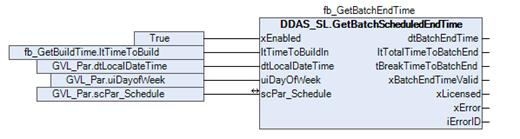
Function block sample input and output parameter:
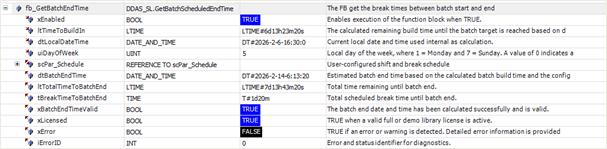
Screenshot example in Online / Monitor mode
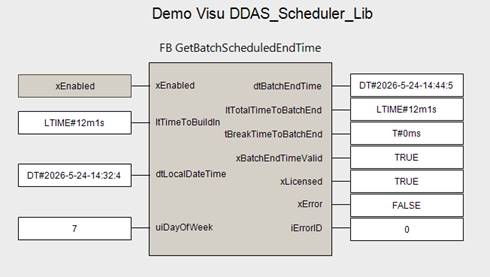
Demo Visualisation
This chapter describes the function block GetSchedule.
Function Block Name: GetSchedule
Library: DDAS_Scheduler_Lib
Dependent Codesys libraries: Util
CODESYS Version Compatibility: CODESYS V3.5 and higher
License / Usage Restrictions: Requires valid full or demo library license
The function block GetSchedule provides information about the currently active production and break schedule. It includes the start and end times of the active schedule, an indication of whether a schedule is active, the duration of the active schedule, start and end cycle trigger bits, as well as information about previous schedules.
This function block is typically used in manufacturing and production automation systems to monitor and evaluate the currently active production and break schedule. It provides real‑time information about schedule start and end times, schedule activity status, and duration, as well as trigger signals for schedule start and end events. The function block can also supply historical schedule information for analysis and reporting.
The scheduler output can be used to synchronize production logic, control machine states, and support operator displays. It enables accurate production planning and ensures the correct handling of breaks, shift changes, and batch transitions within automated processes.
In addition, the scheduler data is highly relevant for Overall Equipment Effectiveness (OEE) calculations. Since OEE is based on planned and unplanned production schedules, reliable schedule start and end triggers are required to correctly initiate and terminate shift‑ and batch‑level calculations. The recorded scheduler information also supports the creation of historical production records for performance analysis and reporting.
The shift calendar supports configuration of up to three shifts per day, with a maximum of nine breaks distributed across the defined shifts.
Activation of the scheduling system is controlled via the scPar_Schedule structure. This structure allows deactivation of the entire schedule, individual days, or specific shifts as required.
The example configuration illustrates a continuous 24-hour operation, where the schedule spans from 06:30 to 06:30 on the following day.
In this case, a single shift is configured to cover the full duration, resulting in only one active shift per day.
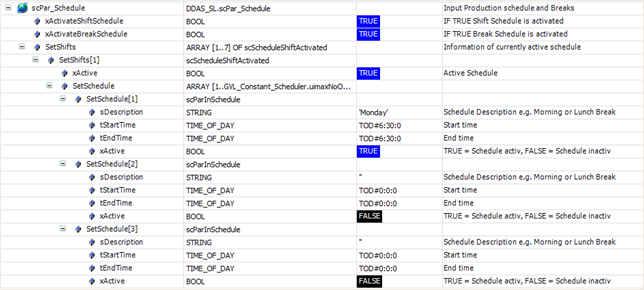
The following example demonstrates a configuration with three active shifts per day.
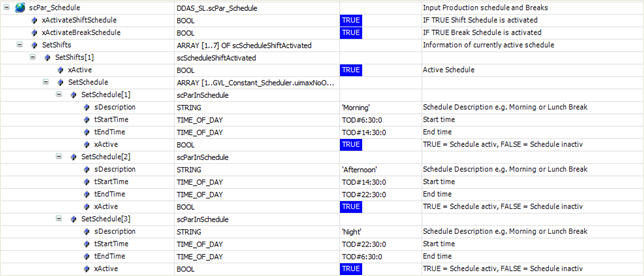
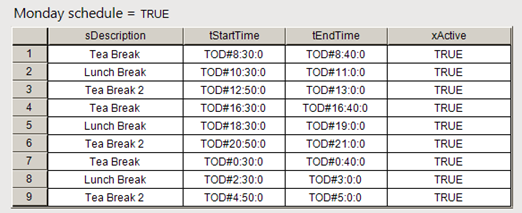
The same principles apply to the configuration of the up to nine breaks per day.
Configurations in which one shift ends at 14:30:00 and the subsequent shift begins at 14:30:00 are permitted. In such cases, the scheduler assigns the full second at 14:30:00 to the active (ending) shift. The subsequent shift will therefore begin at 14:30:01.
Alternatively, configurations in which one shift ends at 14:29:59 and the subsequent shift begins at 14:30:00 are also valid.
Note: Overlapping schedules, where one shift ends at 14:30:01 and the subsequent shift begins at 14:30:00, are not permitted. Such configurations may result in errors or unintended scheduling behaviour.
In Batch mode, an active shift schedule is not required, as batch start and end events control the activation and deactivation of the schedule.
Typically, in this mode, the xHideShift input of the GetSchedule function block should be set to TRUE. This ensures that the day and shift configurations defined in the input structure scPar_Schedule are ignored.
In general, defining a production shift schedule in Batch mode can be useful for indicating planned production periods and for calculating estimated batch end times based on expected production availability. However, this schedule should not be used to determine the active schedule state. Instead, batch activity shall be indicated exclusively via the xBatchActive input.
A combination of Batch mode and shift scheduling is not recommended. However, it may be used in specific applications requiring a mixed mode of batch- and shift-based scheduling.
Active break schedules may still be required and are processed in addition to the xBreakActive input, which is used to indicate special or unplanned breaks. The xHideShift input of the GetSchedule function block does not affect the processing of break schedules.
The GetSchedule function block evaluates and manages the currently effective production schedule within an automation system. Its core purpose is to determine which schedule is active at a given moment—shift, batch, or break—and to provide a consistent, real‑time representation of the scheduling state to the rest of the control application.
The block combines time‑based schedule evaluation with external control signals. It assesses user‑configured shift and break definitions against the current local date, time, and weekday, while also allowing batch and break schedules to be started or stopped explicitly by external logic. This makes it suitable for both calendar‑driven operation (shifts and planned breaks) and event‑driven operation (batches and ad‑hoc breaks).
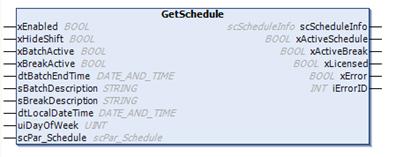
At runtime, GetSchedule
continuously determines:
Break schedules may temporarily interrupt or overlay active production schedules, while batch schedules can be initiated independently of fixed shifts when required. Shift schedules can also be deliberately suppressed, enabling batch‑only operation modes.
In addition to the current state, the function block maintains historical context, preserving information about previously active schedules. This enables reliable downstream use for reporting, analysis, and traceability without requiring additional logic elsewhere in the application.
The function block also handles diagnostics and licensing status, ensuring that schedule evaluation operates only when valid and providing clear error or status feedback if abnormal conditions occur.
Overall, GetSchedule acts as a centralized scheduling authority within the automation software. It decouples time‑ and schedule‑related rules from machine control logic, allowing production sequencing, machine enable states, operator messages, and data collection to remain synchronized with shifts, batches, and breaks in a safe and deterministic way.
.
|
Scope |
Name |
Type |
Comment |
|
Input |
xEnabled |
BOOL |
Enables execution of the function block when TRUE. |
|
xHideShift* |
BOOL |
When TRUE, active shift schedules are ignored. Typically set when only batch mode is used to disable the active schedule. |
|
|
xBatchActive* |
BOOL |
Controls batch schedule activation. TRUE: Starts a batch schedule if no other schedule is currently active. FALSE: Stops the active batch schedule. |
|
|
xBreakActive |
BOOL |
Controls break schedule activation. TRUE: Initiates a break schedule unrelated if another schedule is currently active. FALSE: Terminates an externally started break schedule. |
|
|
dtBatchEndTime |
DT |
Optional: Batch end time input. The end time must be calculated externally and will be send to the ouput information. |
|
|
sBatchDescription |
STRING |
User-defined description of the batch, e.g. batch name, job ID, or production order. |
|
|
sBreakDescription |
STRING |
User-defined description of a break, e.g. ‘Team meeting’. |
|
|
dtLocalDateTime |
DT |
Local Date and Time. |
|
|
uiDayOfWeek |
UINT |
Local day of the week, where 1 = Monday and 7 = Sunday. A value of 0 indicates an unknown weekday. |
|
|
InOut |
scPar_Schedule |
User‑configured shift and break schedule |
|
|
Output |
scScheduleInfo |
Active and history schedule information |
|
|
xActiveSchedule |
BOOL |
TRUE when a shift or batch schedule is currently active. |
|
|
xActiveBreak |
BOOL |
TRUE when a break schedule is currently active. |
|
|
xLicensed |
BOOL |
TRUE when a valid full or demo library license is active. |
|
|
xError |
BOOL |
TRUE if an error or warning is detected. Detailed error information is provided in iErrorID. |
|
|
INT |
Error and status identifier for diagnostics. |
xHideShifts*:
When production operates in
batch mode which is in the most cases the situation, the weekly production
schedule is typically used only to determine the batch end time. Actual
production is executed in batches and takes place within the scheduled
production period.
The scheduler output records the actual start and end times of the batch, rather than the start and end times of the scheduled production period.
xBatchActive*:
When this input
is FALSE and xHideShifts is also FALSE, the scheduler output records the start
and end times of the scheduled production period based on the user‑defined
production settings in scPar_Schedule.
This structure contains the full output information of the function block related to the currently and historical active schedule.
|
Name |
Type |
|
scSchedule |
scScheduleActive |
|
scBreakSchedule |
scScheduleActive |
|
scScheduleHistory |
ARRAY [0..GVL_Constant_Scheduler.uimaxHistory] OF scScheduleHistory |
|
scBreakHistory |
ARRAY [0..GVL_Constant_Scheduler.uimaxHistory] OF scScheduleHistory |
This structure contains the output information of the function block related to the currently active schedule.
|
Name |
Type |
Comment |
Inherited from |
|
dtStartTime |
DT |
Start Time |
|
|
dtEndTime |
DT |
End Time |
|
|
tEndStartDiff |
TIME |
Time difference between Start and End Time |
|
|
tTimeToEnd |
TIME |
Actual Local Time to End time |
|
|
sDescription |
STRING |
Schedule description, e.g. batch ID, morning shift, or lunch break. |
|
|
xActive |
BOOL |
Schedule is active. |
|
|
uiIndex |
UINT |
Array index of the detected schedule; 0 if no schedule is detected. |
|
|
iHistoryIndex |
INT |
Index of the last stored history entry; always 0 for history records. |
|
|
xBeginOfStartTime |
BOOL |
TRUE for one PLC cycle when a new active start time is detected. |
|
|
xEndOfEndTime |
BOOL |
TRUE for one PLC cycle when a new active end time is detected. |
|
|
eScheduleEvent |
Describe the schedule event |
This structure contains the date time output information of the function block related to the currently active schedule.
|
Name |
Type |
Comment |
|
dtStartTime |
DT |
Start Time |
|
dtEndTime |
DT |
End Time |
|
tEndStartDiff |
TIME |
Time difference between Start and End Time |
|
tTimeToEnd |
TIME |
Actual Local Time to End time |
This structure contains the output information of the function block related to the history of active schedule.
|
Name |
Type |
Comment |
Inherited from |
|
dtStartTime |
DT |
Start Time |
|
|
dtEndTime |
DT |
End Time |
|
|
tEndStartDiff |
TIME |
Time difference between Start and End Time |
|
|
tTimeToEnd |
TIME |
Actual Local Time to End time |
|
|
sDescription |
STRING |
Schedule description, e.g. batch ID, morning shift, or lunch break. |
|
|
xActive |
BOOL |
Schedule is active. |
|
|
uiIndex |
UINT |
Array index of the detected schedule; 0 if no schedule is detected. |
|
|
iHistoryIndex |
INT |
Index of the last stored history entry; always 0 for history records. |
|
|
xBeginOfStartTime |
BOOL |
TRUE for one PLC cycle when a new active start time is detected. |
|
|
xEndOfEndTime |
BOOL |
TRUE for one PLC cycle when a new active end time is detected. |
|
|
eScheduleEvent |
Describe the schedule event |
||
|
dtEvent |
DT |
Event time of Start or End event |
|
|
scSchedule |
Show Start and End time of schedule which can be different to real Start and End time |
Note: The structures scScheduleHistory[x].scSchedule and scBreakHistory[x].scSchedule provide valid information only when a shift or break schedule is used. If batch-based or external breaks are applied instead, these structures do not contain valid data, as such batches or breaks are not planned or scheduled events.
The function block is intended to be executed cyclically in a task context.
Timing precision depends on the configured task cycle time and target platform
If an internal error, a library issue, or a licensing problem occurs, xError is set to TRUE and iErrorID provides the corresponding error code. Detailed descriptions of the error codes are defined in the enumeration eError.
Accuracy depends on the system clock. Hardware‑dependent behavior may vary across different CODESYS platforms.
The shift calendar is limited to a 7‑day period, with up to three shifts and nine breaks configurable per day. Additionally, the scheduler maintains a history of the most recent ten schedule events.
Before ordering this library, please verify the correct functionality of the library function block in your target system.
Declaration and Call of the Function Block GetSchedule:
GVL_Par:
VAR_GLOBAL
|
xHideShift |
: BOOL; |
// A TRUE signal will skip active shift schedules; Normally set when only batch mode is used for active schedule. |
|
xExternActiveBatch |
: BOOL; |
// If TRUE a non-scheduled batch schedule is active, is FALSE schedule ends |
|
xExternActiveBreak |
: BOOL; |
// If TRUE a non-scheduled break scheudle is active, is FALSE schedule ends |
|
dtBatchEndTime |
: DT; |
// Batch end time with breaks |
|
sJobID |
: STRING := 'ID4711_6543'; |
// Sample Batch ID string |
|
sBreak |
: STRING:= 'Team Meeting'; |
// Sample extern Break description |
|
dtLocalDateTime |
: DT; |
// Local Date and Time |
|
uiDayofWeek |
: UINT; |
// Local Day of week |
|
scPar_Schedule |
: DDAS_SL.scPar_Schedule; |
// Input Production schedule and Breaks |
|
scScheduleInfo |
: DDAS_SL.scScheduleInfo; |
// Output FB GetSchedule |
END_VAR
VAR
fb_GetSchedule : DDAS_SL.GetSchedule;
END_VAR
FB call in structure text:
fb_GetSchedule(
xEnabled := TRUE,
xHideShift := GVL_Par. xHideShift,
xBatchActive := GVL_Par. xExternActiveBatch,
xBreakActive := GVL_Par. xExternBreakBatch,
dtBatchEndTime := GVL_Par. dtBatchEndTime,
sBatchDescription := GVL_Par. sJobID,
sBreakDescription := GVL_Par. sBreak,
dtLocalDateTime := GVL_Par. dtLocalDateTime,
uiDayOfWeek := GVL_Par. uiDayOfWeek,
scPar_Schedule := GVL_Par. scPar_Schedule
);
FB call in continuous function chart diagram:
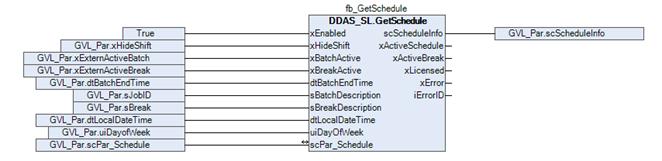
Function block sample input and output parameter:
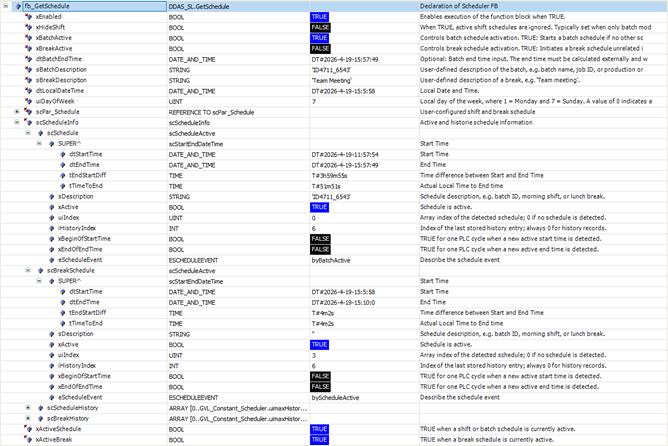
Screenshot example in Online / Monitor mode active shift/batch and break information.
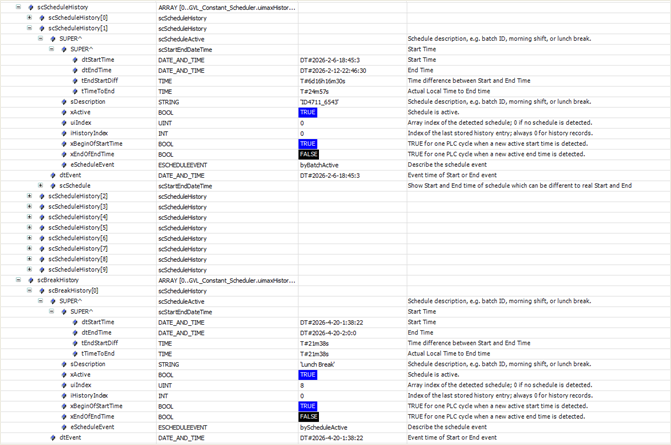
Screenshot example in Online / Monitor mode history shift/batch and break information.
Demo Visualisation
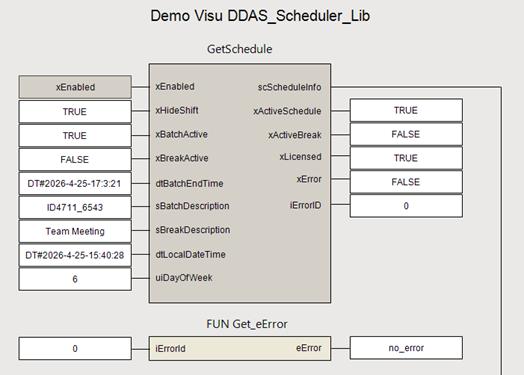
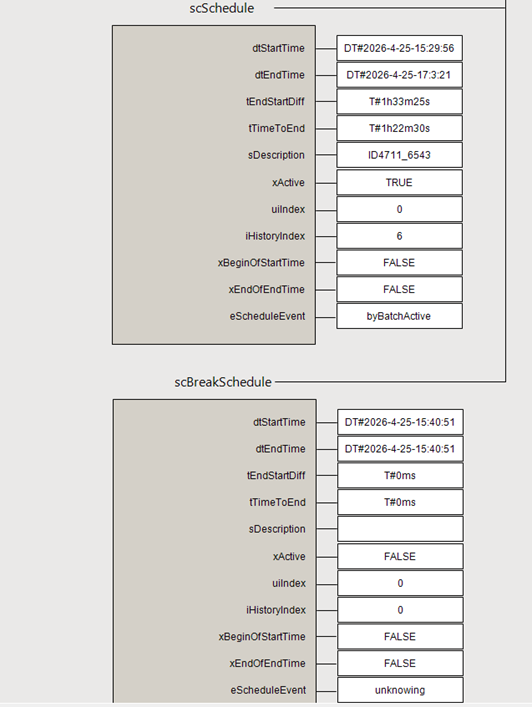
This chapter describes the function block UpdateInterval.
Function Block Name: UpdateInterval
Library: DDAS_Scheduler_Lib
Dependent Codesys libraries: n/a
CODESYS Version Compatibility: CODESYS V3.5 and higher
License / Usage Restrictions: Requires valid full or demo library license
This function block implements an interval-based filter for date and time values, limiting update frequency to match user or display requirements and avoiding excessive cyclic refreshes.
When date and time information is updated cyclically at a high frequency, directly refreshing the display can be inconvenient for the operator.
This function block provides a filter to update date and time values only as required for the user, reducing unnecessary display updates.
The UpdateInterval function block controls the update rate of a date and time signal by applying an interval-based and event-driven filter. It is intended to prevent unnecessary high-frequency updates, improving readability and usability for operator displays and downstream consumers.
When enabled, the function block accepts an input date/time value and updates the output either periodically based on a configurable time interval or immediately in response to dedicated event signals.
Multiple event inputs allow external triggering of updates independent of the cyclic interval. Diagnostic and licensing status outputs are provided to support reliable operation and integration.
Additional status outputs support license verification and diagnostic handling.
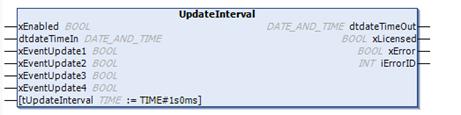
When enabled via xEnabled,
the function block processes the incoming date and time value provided at
dtDateTimeIn.
The update of the output date and time is controlled either by a configurable cyclic interval (tUpdateInterval) or by event-driven triggers.
Four independent event inputs (xEventUpdate1 to xEventUpdate4) allow immediate updating of the output on rising or falling signal edges, enabling external control over when updates occur.
The filtered and conditionally updated date and time value is made available at dtDateTimeOut.
The function block additionally provides the xLicensed output to indicate whether a valid full or demo license is active. Any detected error or warning condition is signalled via xError, with further diagnostic details provided through the iErrorID output.
|
Scope |
Name |
Type |
Initial |
Comment |
|
Input |
xEnabled |
BOOL |
Enables execution of the function block when TRUE. |
|
|
dtdateTimeIn |
DT |
Input Date Time value |
||
|
xEventUpdate1 |
BOOL |
Update 1. output on rising and falling edge |
||
|
xEventUpdate2 |
BOOL |
Update 2. output on rising and falling edge |
||
|
xEventUpdate3 |
BOOL |
Update 3. output on rising and falling edge |
||
|
xEventUpdate4 |
BOOL |
Update 4. output on rising and falling edge |
||
|
tUpdateInterval |
TIME |
TIME#1s0ms |
Time base that defines how often date and time information is updated |
|
|
Output |
dtdateTimeOut |
DT |
Output Date Time value |
|
|
xLicensed |
BOOL |
TRUE when a valid full or demo library license is active. |
||
|
xError |
BOOL |
TRUE if an error or warning is detected. Detailed error information is provided in iErrorID. |
||
|
iErrorID |
INT |
Error and status identifier for diagnostics. |
The function block is intended to be executed cyclically in a task context.
Timing precision depends on the configured task cycle time and target platform
If an internal error, a library issue, or a licensing problem occurs, xError is set to TRUE and iErrorID provides the corresponding error code. Detailed descriptions of the error codes are defined in the enumeration eError.
Accuracy depends on the system clock. Hardware‑dependent behavior may vary across different CODESYS platforms.
Before ordering this library, please verify the correct functionality of the library function block in your target system.
Declaration and Call of the Function Block UpdateInterval:
GVL_Par:
VAR_GLOBAL
|
dtBatchEndTime |
: DT; |
// Batch end time with breaks |
|
xUpdate1 |
: BOOL; |
// Condition 1 for update date time output |
|
xUpdate2 |
: BOOL; |
// Condition 2 for update date time output |
|
tUpdateInterval |
: TIME := T#1m; |
// Update output based on update interval time
|
END_VAR
VAR
fb_ UpdateInterval : DDAS_SL. UpdateInterval;
END_VAR
FB call in structure text:
fb_ UpdateInterval(
xEnabled := TRUE,
dtdateTimeIn := GVL_Par_SL.dtBatchEndTime,
xEventUpdate1 := GVL_Par_SL.xUpdate1,
xEventUpdate2 := GVL_Par_SL.xUpdate2,
dtLocalDateTime := GVL_Par_SL.tUpdateInterval
);
FB call in continuous function chart diagram:
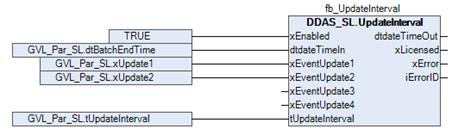
Function block sample input and output parameter:
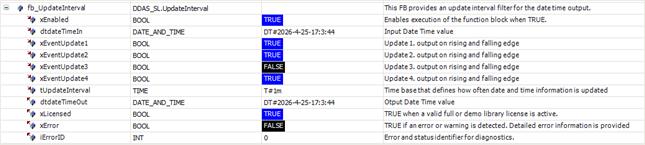
Screenshot example in Online / Monitor mode
This structure provides the user‑configured shift, production, and break schedules.
|
Name |
Type |
Comment |
|
xActivateShiftSchedule |
BOOL |
IF TRUE Shift Schedule is activated |
|
xActivateBreakSchedule |
BOOL |
IF TRUE Break Schedule is activated |
|
SetShifts |
ARRAY [1..7] OF scScheduleShiftActivated |
Information of currently active schedule |
|
SetBreaks |
ARRAY [1..7] OF scScheduleBreakActivated |
Information of currently active break |
This structure provides the user‑configured production shift schedules.
|
Name |
Type |
Comment |
|
xActive |
BOOL |
Active Schedule |
|
SetSchedule |
ARRAY [1..GVL_Constant_Scheduler.uimaxNoOfShifts] OF scParInSchedule |
This structure provides the user‑configured production break schedules.
|
Name |
Type |
Comment |
|
xActive |
BOOL |
Active Schedule |
|
SetSchedule |
ARRAY [1..GVL_Constant_Scheduler.uimaxNoOfShifts] OF scParInSchedule |
This structure provides the user‑configured single production schedules.
|
Name |
Type |
Initial |
Comment |
|
sDescription |
STRING |
Schedule Description e.g. Morning or Lunch Break |
|
|
tStartTime |
TOD |
Start time |
|
|
tEndTime |
TOD |
End time |
|
|
xActive |
BOOL |
FALSE |
TRUE = Schedule activ, FALSE = Schedule inactiv |
Demo Visualisation
Shift Schedule
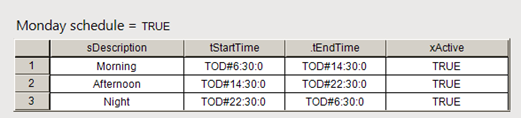
Break Schedule
Schedule event type enumeration.
|
Name |
Initial |
Comment |
|
noActive |
0 |
no active event |
|
byStartTime |
1 |
Schedule start detect by Start time |
|
byScheduleActive |
2 |
Schedule start detect by rising xActive |
|
byEndTime |
3 |
Schedule end detect by End time |
|
byScheduleNotActive |
4 |
Schedule end detect by falling xActive |
|
byBatchActive |
5 |
Extern Batch start detect by rising xBatchActive |
|
byBatchNotActive |
6 |
Extern Batch end detect by falling xBatchActive |
|
byBreakActive |
7 |
Extern Break start detect by rising xBreakActive |
|
byBreakNotActive |
8 |
Extern Break end detect by falling xBreakActive |
Library Possible Error Codes and Descriptions.
|
Name |
Initial |
Comment |
|
no_error |
0 |
No error detected. |
|
no_ValidLicense |
10 |
No valid license was found. Please verify the library license using DDAS_LM.Get_Lib_License. |
|
invalid_LocalDateTime |
21 |
Invalid dtLocalDateTime = DT#1970-01-01-00:00:00. |
|
invalid_eDayofWeek |
23 |
Invalid week day eDayofWeek = 0 or eDayofWeek > 7. |
|
invalid_DateTimeBoundries |
25 |
Invalid dtLocalDateTime = DT#1970-01-01-00:00:00 or dtLocalDateTime = DT#2106-02-07-06:28:15). |
|
invalid_InputParameter |
30 |
One or more input parameters are zero or outside the permitted range. |
|
no_Active_Schedule |
31 |
No active schedule was found.. |
|
week_overlow |
40 |
Batch end behind one week. |
|
ltime_overflow |
41 |
The calculated LTime value is greater than 1000 days and exceeds the allowed range. |
|
time_overflow |
42 |
The calculated LTime value is greater than 49 days and exceeds the allowed range. |
Library scheduler constants.
|
Scope |
Name |
Type |
Initial |
Comment |
|
Constant |
uimaxNoOfShifts |
UINT |
3 |
Max. number of shifts per day (24 hours), (array starts by index 1) |
|
uimaxNoOfBreaks |
UINT |
9 |
Max. number of breaks per day (24 hours), (array starts by index 1) |
|
|
uimaxHistory |
UINT |
9 |
Max. history area (array starts by index 0) |
This Global Variable List provides the library license GUID. Relevant input parameter for the function block DDAS_LM.Get_Lib_License, required to activate the library license in conjunction with the activation key and side code.
|
Scope |
Name |
Type |
Initial |
Comment |
|
Constant |
cLibraryGuid |
STRING |
‘{LIB-DDAS-0A3F1609}’ |
Unique Library license GUID for use in the user program to activate the library license. |
The following screenshots illustrate a complete implementation of the library function blocks, including the license function block and a simple set/reset function block used to start and stop a batch.
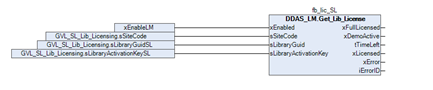
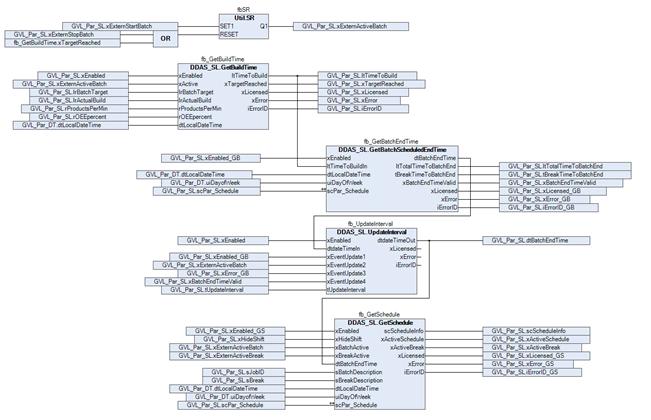
The current local date, time, and day of the week can be obtained using the DDAS function block DDAS_DT.GetDateTimeInfo from the DDAS_DateTime_lib library.
|
|
These instructions have been prepared to the best of our knowledge and belief to provide you with the highest possible level of support when working with our product.
Despite our best efforts, we may not always fully achieve this objective. If you identify any issues or have suggestions for improvement, we would greatly appreciate your feedback.
Please send your comments or criticism in a short e‑mail to:
Thank you for your support.
Your DDAS Application Software Team |


