

DDAS Application Template Manual
About this documentation
This documentation provides essential information for working with components of the DDAS software ecosystem. It is intended for software developers and machine manufacturers who integrate, validate, and operate DDAS function blocks within CODESYS‑based applications.
Note!
Before installing or configuring any software, ensure that you have read and understood the operating instructions of all relevant hardware devices!
Tip!
Further information can be found at: https://www.ddas.digital
This manual is part of the DDAS library collection, which includes documentation for license management, date and time handling, scheduling, equipment performance, and other functional modules:
| Documentation | Subject |
|---|---|
| DDAS LicenseManager Library Manual | Description and usage of the library license management function blocks |
| DDAS DateTime Library Manual | Description and usage of the library date time function block. |
| DDAS Scheduler Library Manual | Description and usage of the library scheduler function block. |
| DDAS EquipmentPerformance Library Manual | Description and usage of the library Equipment Performance function block. |
Document history
| Version | Description | ||
|---|---|---|---|
| 1.0 | 08.05.2026 | DDAS | Initial version |
General
Purpose
This manual describes the use of an application template designed to simplify the implementation of DDAS function blocks during commissioning.
The application template can be used in the following ways:
Integration into an existing machine program
Deployment on an external device as an independent PLC application
In both cases, the application template provides a defined interface consisting of input and output variables.
From an implementation perspective, there are generally no differences between the two approaches. Therefore, these options are not described separately in this document, as the communication method to be used is not predefined and may vary depending on the application.
The input variables must be assigned either:
directly within the machine PLC program when integrated into an existing machine application, or
via a communication interface between the machine controller and the external device when deployed as a separate PLC application.
The output variables are directly assigned by the function blocks via the application template. The resulting output information can then be used as required by the machine program or a machine visualization.
The application template already includes all required function blocks, which are executed in their logical sequence. All input and output variables are assigned through global variable lists.
For testing purposes, the template also includes a small example machine program and corresponding visualizations. It can be executed as an independent PLC application in demo mode without a valid license.
These components are intended solely for testing and commissioning purposes and are not required for use in a real machine application. They must be removed or excluded in the final implementation.
Requirements
The application template and the associated libraries are CODESYS-based software modules developed using the CODESYS Engineering Tools (Version 3.5).
The software is compatible with CODESYS based Engineering Tools and can be used and integrated within existing PLC machine programs.
They are designed to run on compatible CODESYS runtime systems, such as the CODESYS Control Win V3 x64 runtime.
The use of persistent variables is optional; however, it is required if historical data needs to be retained.
The application template and its function blocks must be called cyclically within the user application or machine program to ensure proper operation.
For further information, please refer to the “Assumptions & Limitations” section in the library manual.
The libraries utilize a dedicated licensing mechanism. The standard CODESYS licensing model is not applicable to this software. Further details are provided in the “Licensing Concept” chapter below.
Dependency CODESYS Libraries
The following CODESYS libraries are required for the Application Template and DDAS libraries. These libraries are included in the DDAS package:
Standard Library – Version 3.5.18.0
Util Library – Version 3.5.21.0
Note: Ensure that the specified library versions are installed in the CODESYS Library Repository before importing or building the project.
User Responsibilities
Note: It is the user’s responsibility to test and validate the application template and all associated function blocks for the specific configuration prior to use in a production environment.
Demo Visualization
The demo visualizations may behave differently depending on the tools and runtime environment, for example in terms of variable display formats, fonts, scaling behaviour, and real/date-time representation.
These visualizations are intended solely for demonstration purposes to provide a better understanding of how the function blocks operate and what information they provide. They are not required for a real machine application or for the operation of any library function block.
Available Template Formats
Distribution
The application template is provided in multiple formats to ensure maximum compatibility across CODESYS® and CODESYS-compatible engineering environments. All template files are installed together with the DDAS Libraries by the CODESYS Installer and can be found at the following location:
%USERPROFILE%\DDAS\3.5.1.0\Package\Component_4\File_0
1. Native CODESYS Project
File: AppTemplateProject_3.5.1.0.project
This is the native CODESYS project format and can be opened directly in the CODESYS Development System V3.5 SP22. It is recommended for users working within the standard CODESYS environment and provides the fastest deployment experience.
2. CODESYS Project Archive
File: AppTemplateProject_3.5.1.0.projectarchive
The project archive format contains the complete project without a predefined target device assignment. This format is recommended when transferring the application between different CODESYS-based engineering tools, as a suitable target device can be selected during import.
Note:
During import, the engineering tool may prompt to overwrite existing
DDAS libraries if the same library version is already installed on the
system through the CODESYS Installer. This is expected behaviour and can
be safely confirmed to ensure that the installed library files match the
versions contained in the distribution package.
3. CODESYS Export File
File: AppTemplateProject_3.5.1.0.export
The export format allows the application template to be imported into existing CODESYS projects. This option is useful when integrating DDAS functionality into an already established application structure.
After importing the export file, all DDAS libraries and their required dependencies must be added manually to the PLC project. Ensure that the following libraries are available and referenced:
DDAS_LicenseManager_Lib (actual version)
DDAS_DateTime_Lib (actual version)
DDAS_Scheduler_Lib (actual version)
DDAS_EquipmentPerformance_Lib (actual version)
Standard Library – Version 3.5.18.0
Util Library – Version 3.5.21.0
Note:
Depending on the target engineering environment, the required system
library versions may not be available by default. In such cases, the
user may need to manually resolve library references or install the
required library versions before the project can be compiled
successfully.
Additional Configuration
After importing all files and adding the required library references, the program DDAS_PLC_PRG must be assigned to the application's Main Task.
To assign the program:
Open the Task Configuration object in the PLC project.
Select the Main Task.
Add a new program call.
Select DDAS_PLC_PRG as the program instance.
Save and compile the project.
Note:
The application template logic is executed from the
DDAS_PLC_PRG program. If the program is not assigned to
the Main Task, the DDAS functionality will not be executed during
runtime.
4. PLCopen XML Project
File: AppTemplateProject_3.5.1.0.xml
The PLCopen XML format provides the highest degree of interoperability and can be imported into many CODESYS-compatible engineering environments. This format is particularly recommended when migrating projects between different vendors or when library version and placeholder resolution issues prevent direct project import.
Note: After importing the PLCopen XML file, follow the same configuration and installation steps described in the CODESYS Export File section. This includes:
Adding all required DDAS and dependency libraries to the PLC project.
Resolving any missing library references.
Assigning DDAS_PLC_PRG to the application's Main Task within the Task Configuration.
Depending on the target engineering environment, additional manual library resolution may be required before the project can be compiled and executed successfully.
Compatibility Notes
Different CODESYS-based engineering tools may use different versions of system libraries and compiler components. As a result, manual resolution of library references may be required after importing or opening a project in another engineering environment.
For maximum portability between different vendor-specific CODESYS platforms, the Project Archive (.projectarchive) and PLCopen XML (.xml) formats are recommended, as they allow project dependencies to be resolved within the target engineering system and reduce compatibility issues related to library versioning and placeholder mappings.
Licensing Concept
All libraries require a valid license. Each license is based on three mandatory keys:
SiteCode
Provided by the user (e.g. ‘DDAS-Site-License’)LibraryGuid
Delivered with the library (e.g. ‘{LIB-DDAS-D5BA612E}’)LibraryActivationKey
Issued by DDAS (e.g. ‘EDB86DA0’)
License Activation Mechanism
To activate a library license, one instance of the function block
Get_Lib_License must be called for each licensed
library.
This function block is part of the
DDAS_LicenseManager_Lib library.
Licensing Process
The following steps are required to license and use a library:
The user selects the required libraries.
The user integrates the selected libraries into a test project or uses the provided demo program and evaluates them using the time‑limited demo license.
If the user intends to use the library function blocks in a machine application, the library is ordered and the selected SiteCode is sent to DDAS.
DDAS provides the corresponding LibraryActivationKey.
In the machine application, the user instantiates the function block Get_Lib_License once for each library and assigns all required license keys to activate the library license.
After successful activation, all function blocks of the licensed library can be implemented and executed.
Application Template Step-by-Step
The following chapters provide a step-by-step guide on how to use the application template to test all function blocks and integrate them into an existing machine application. Alternatively, the template can be operated as a standalone application on an external controller or device, such as an edge device.
General structure
The application template is divided into three main sections:
Library Function Block Handling
This section manages and executes the library function blocks. Each library is organized into its own dedicated subsection to clearly identify which function blocks belong to which library.Machine Interface (Global and Persistent Variables)
This section contains the global and persistent variable lists that define the machine interface. All required inputs for the library function blocks must be assigned to the global input variable list through this interface.
Selected outputs from the function blocks are pre-assigned and can be used directly by the machine program or visualization. These assignments can be modified or extended as needed.
Additionally, persistent variables can be configured here to store historical output data when required.Sample Machine Program
This section provides a simplified and minimal example of a machine program. It is designed to demonstrate how to test all function blocks and illustrate the implementation approach, as well as the typical programming effort required for integrating them into a user-specific machine application.
An additional section of the application template includes the standard PLC_PRG program, a version file, and the task configuration. These are standard modules present in every program (with the version file being optional) and are therefore not described further in this document.
The Library Function Block section (see graphic below) contains an AppSample folder as well as visualization examples for the respective library function blocks. These examples are intended to support understanding and demonstrate the use of the individual function blocks.
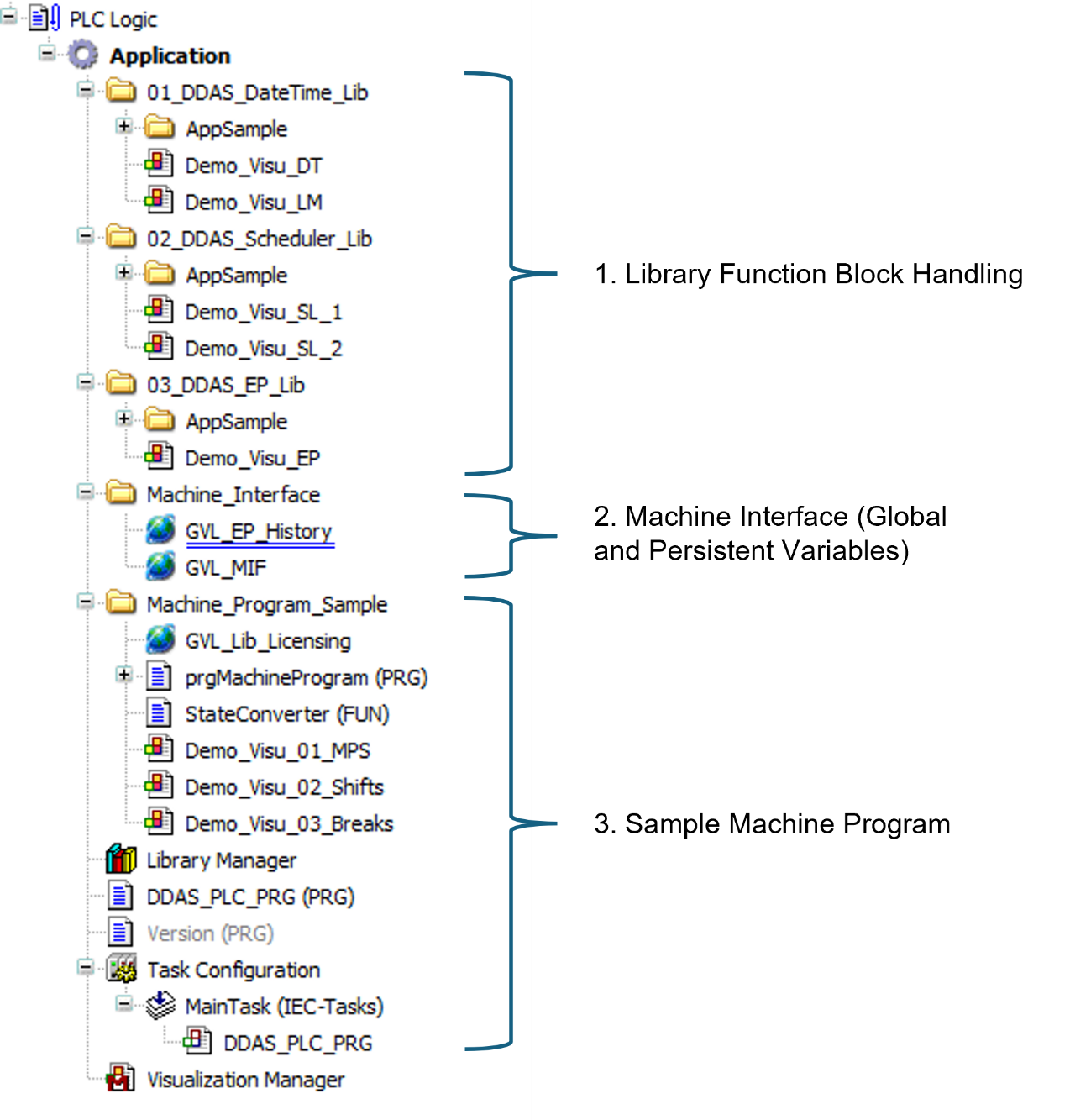
The image above shows the program structure of the application template.
Library Function Block
Each library is organized in its own folder, following a consistent structure:
A global variable list for inputs and outputs of the library function blocks
A separate global variable list for library-specific licensing contains the assigned library guid (no changes required)
A program that calls the function blocks with all inputs, including relevant subprograms (actions)
Demonstration and test visualizations for the relevant function blocks
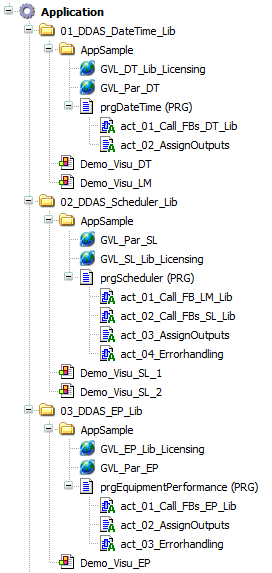
The sample image above illustrates the library function block program structure of the application template. Depending on the number of libraries included, the structure may vary in size and complexity.
In general, these application program components can be directly copied without modification into any user machine program when integrating the application template into an existing program. The subprogram “xx_AssignOutput” can be modified or extended if additional function block outputs need to be included.
Machine Interface
The machine interface contains two global variable lists:
Persistent Global Variable List
This list contains variables for handling relevant historical data. These variables can optionally be copied into an existing PersistentVars global variable list within the user application. Afterward, this list can be removed if no longer required.
Storing historical data is optional. If such data is not needed, this list can be deleted to avoid unnecessarily increasing the size of the user’s persistent variable list.Input and Output List (GVL_MIF)
This list defines all required input and output variables used by the application. It serves as the software interface between the user’s machine application and the library function blocks.
These variables are assigned either directly within the user machine program or via a communication interface when the application template is used on an external device.
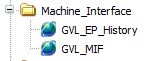
The image above shows the machine interface program structure of the application template.
The number of required input variables is reduced to the minimum necessary.
The output variables provide a selection of useful information for dashboarding and statistical analysis. However, the output interface can be adapted or extended as needed.
Sampel Machine Program
This section provides a sample user machine program that demonstrates how to handle the library function block machine interface. It illustrates what needs to be implemented in a user machine program to correctly interface with the library function blocks.
When using the application template on an external device, this section should either be removed or deactivated by not calling the program “prg_MachineProgram” from the PLC_PRG program.
However, the global variable list “GVL_Lib_Licensing” can still be used to assign the site and activation codes for all libraries within the application template.
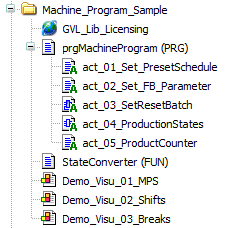
The image above shows a sample and minimised user machine program structure of the application template.
The program “prgMaschineProgram” demonstrates the coding required in a user machine program in conjunction with the “StateConverter” function.
The program action “Set_PresetSchedule” shows how to configure a weekly shift schedule, including breaks, when the weekly scheduler is used.
The program action “Set_FB_Parameter” provides a sample configuration of function block parameters that may be relevant for user-specific operational behaviour.
The program action “SetResetBatch” demonstrates example logic for controlling a batch run using start/stop Boolean variables.
The program action “ProductionStates”, in conjunction with the “StateConverter” function, illustrates sample logic for converting machine program states into the required state model for the function block “EquipmentPerformance”.
This implementation is critical for the calculation of efficiency and downtime KPIs.
This part of the program may vary significantly and should be adapted to the specific requirements of each user machine application.The program action “ProductCounter” generates virtual product counts required for the demonstration of operation of the library function blocks. It must be replaced with actual machine product counters in a real application.
The demo visualization “xx_MPS” is designed to demonstrate the handling of the machine interface, the operation of all function blocks, and the relevant machine interface inputs and outputs.
Via the “xEnableDemo” Button the sample machine program and the visualisation can be activated.
A batch can be easily started and stopped using the provided Start/Stop control. During operation, products are generated, and the batch end time is calculated based on the active production schedule. In addition, overall equipment performance and downtime KPIs are evaluated.
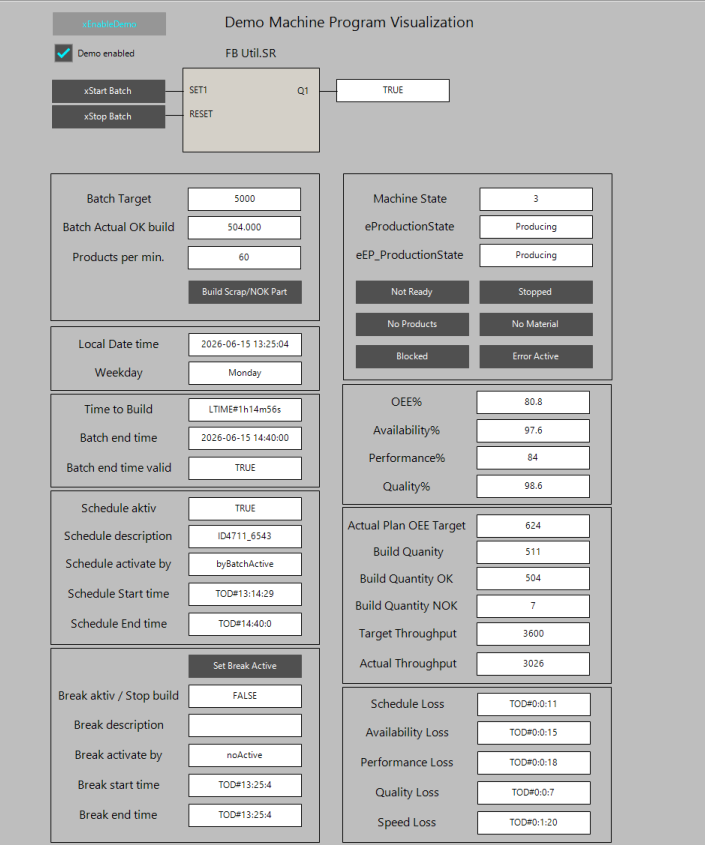
The image above shows the visualization “xx_MPS” in monitor mode.
Additionally, events such as breaks, downtime, or scrap parts can be simulated using the controls provided in the user interface.
Using the visualization is the fastest way to execute all provided library function blocks and to understand the basic operation of the machine interface by observing the relevant outputs generated by the individual function blocks.
Note: This visualization displays only a subset of the available information. Additional output data can be accessed in the library sample visualizations or within the output structures of the function blocks assigned to the global variable lists.
Attention: Activating the sample machine program will overwrite global variables in the machine interface global variable list (GVL_MIF). If the application template is used in a production machine, this sample program must be removed or disabled. Otherwise, it may cause unexpected issues within the function block interface.
The additional visualization “xx_Shifts” and “xx_Breaks” visualized the actual shift and break schedule.
Licensing
All library licenses can be assigned in the global variable list “GVL_Lib_Licensing”. A valid site and activation code must be provided for operation in a production machine.
For testing the application template, a license is not required. Without a valid license, all library function blocks operate without limitations for up to two hours after runtime start. This period is sufficient to validate the results of each function block and assess their relevance for the user’s application.
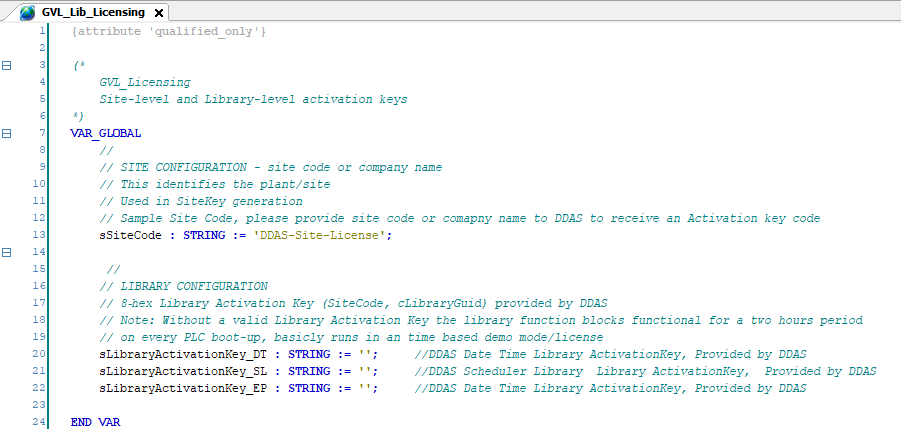
The image above shows a sample of the global variable list “GVL_Lib_Licensing”.
Your Feedback Matters
These instructions have been prepared to the best of our knowledge and belief to provide you with the highest possible level of support when working with our product.
Despite our best efforts, we may not always fully achieve this objective. If you identify any issues or have suggestions for improvement, we would greatly appreciate your feedback.
Please send your comments or criticism in a short e‑mail to:
Thank you for your support.
Your DDAS Application Software Team