DDAS Date and Time Library Manual
About this documentation
This documentation provides essential information for working with components of the DDAS software ecosystem. It is intended for software developers and machine manufacturers who integrate, validate, and operate DDAS function blocks within CODESYS‑based applications.
Note!
Before installing or configuring any software, ensure that you have read and understood the operating instructions of all relevant hardware devices!
Tip!
Further information can be found at: https://www.ddas.digital
This manual is part of the DDAS library collection, which includes documentation for license management, date and time handling, scheduling, equipment performance, and other functional modules:
| Documentation | Subject |
|---|---|
| DDAS LicenseManager Library Manual | Description and usage of the library license management function blocks |
| DDAS DateTime Library Manual | Description and usage of the library date time function block. |
| DDAS Scheduler Library Manual | Description and usage of the library scheduler function block. |
| DDAS EquipmentPerformance Library Manual | Description and usage of the library Equipment Performance function block. |
Document history
| Version | Description | ||
|---|---|---|---|
| 1.0 | 14.04.2026 | DDAS | Initial version |
General
Library
This library provides function blocks for retrieving local and UTC date and time information. It is intended for applications that require reliable and consistent time data, such as data logging, event time stamping, and system-wide time synchronization.
The library supplies local time, UTC time, and a UTC-based timestamp with millisecond resolution in predefined, standardized formats.
The library includes the following user function block:
GetDateTimeInfo
Detailed descriptions of the function blocks and their relevant dependencies are provided in the following chapters.
Licensing Concept
All libraries require a valid license. Each license is based on three mandatory keys:
SiteCode
Provided by the user (e.g. ‘DDAS-Site-License’)LibraryGuid
Delivered with the library (e.g. ‘{LIB-DDAS-D5BA612E}’)LibraryActivationKey
Issued by DDAS (e.g. ‘EDB86DA0’)
License Activation Mechanism
To activate a library license, one instance of the function block
Get_Lib_License must be called for each licensed
library.
This function block is part of the
DDAS_LicenseManager_Lib library.
Licensing Process
The following steps are required to license and use a library:
The user selects the required libraries.
The user integrates the selected libraries into a test project or uses the provided demo program and evaluates them using the time‑limited demo license.
If the user intends to use the library function blocks in a machine application, the library is ordered and the selected SiteCode is sent to DDAS.
DDAS provides the corresponding LibraryActivationKey.
In the machine application, the user instantiates the function block Get_Lib_License once for each library and assigns all required license keys to activate the library license.
After successful activation, all function blocks of the licensed library can be implemented and executed.
Note: Detailed information on how to use the function block Get_Lib_License is provided in the software manual of the library DDAS_LicenseManager_Lib.
Note: The function Get_sError is available in every library and provides access to the error description and enumeration corresponding to a function block’s error code, when required.
FB GetDateTimeInfo
General Information
This chapter describes the function block GetDateTimeInfo.
Function Block Name: GetDateTimeInfo
Library: DDAS_DateTime_Lib
Dependent Codesys libraries: SysTime | SysTimeRtc | Util
CODESYS Version Compatibility: CODESYS V3.5 and higher
License / Usage Restrictions: Requires valid full or demo library license
Purpose & Scope
The GetDateTimeInfo function block provides
consistent access to local time, UTC time,
and a UTC-based timestamp in milliseconds or seconds.
It is designed for applications where synchronized and comparable time
information
is required across different systems or devices.
Typical Use Cases
Event and alarm time stamping
Production data logging
Time synchronization reference for distributed control systems
HMI display of local and UTC time
Functional Overview
When enabled, the function block GetDateTimeInfo periodically retrieves the current system’s time.
It outputs:
- Local date and time
- Day of week
- Structured date and time details
- Optional millisecond-accurate UTC timestamp
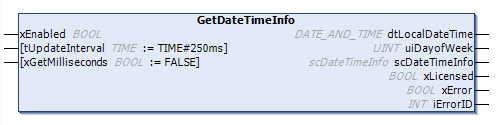
The update interval is configurable within a range of 0 to 1 second.
The update interval shall be selected according to application needs. Short intervals increase accuracy but may increase system load
The function block uses CODESYS system time and real-time clock
services to
retrieve both local and UTC date/time information.
Error states are monitored continuously and reported via diagnostic
outputs.
Interface Description
Function block Inputs and Outputs
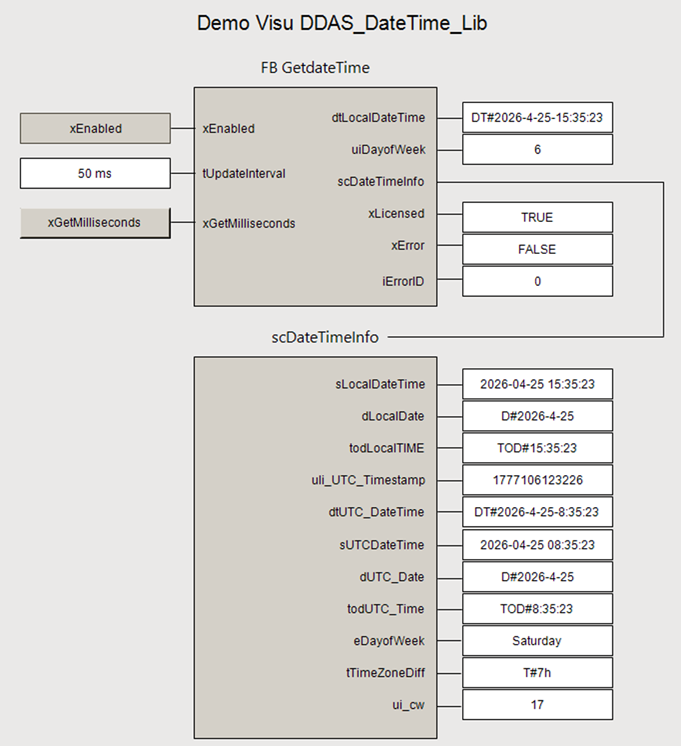
| Scope | Name | Type | Initial | Comment |
|---|---|---|---|---|
| Input | xEnabled | BOOL | Enables execution of the function block when TRUE. | |
| tUpdateInterval | TIME | TIME#250ms | Time base that defines how often date and time information is updated (e.g. T#250ms updates the date and time every 250 ms). The time base is limited to T#1s. |
|
| xGetMilliseconds | BOOL | FALSE | When set to TRUE, time is provided in milliseconds; otherwise, time is provided in seconds. | |
| Output | dtLocalDateTime | DT | Local Date and Time. | |
| uiDayofWeek | UINT | Local day of the week, where 1 = Monday and 7 = Sunday. A value of 0 indicates an unknown weekday. | ||
| scDateTimeInfo | scDateTimeInfo | Detail information about Date and Time. | ||
| xLicensed | BOOL | TRUE when a valid full or demo library license is active. | ||
| xError | BOOL | TRUE if an error or warning is detected. Detailed error information is provided in iErrorID. | ||
| iErrorID | INT | Error and status identifier for diagnostics. |
Structures
scDateTimeInfo
This structure provides UTC and local date and time in various formats, as well as the current day of the week and calendar week.
| Name | Type | Comment |
|---|---|---|
| sLocalDateTime | STRING | Local Date and Time string. |
| dLocalDate | DATE | Local Date. |
| todLocalTIME | TOD | Local Time in time of day format. |
| uli_UTC_Timestamp | ULINT | Unix UTC Timestamp. |
| dtUTC_DateTime | DT | UTC Date and Time. |
| sUTCDateTime | STRING | UTC Date and Time string. |
| dUTC_Date | DATE | Date of UTC Time. |
| todUTC_Time | TOD | UTC Time in time of day format. |
| eDayofWeek | eWeekday | Local Day of the week. |
| tTimeZoneDiff | TIME | Time difference between Local and UTC Time. |
| ui_cw | UINT | Local Calendar week. |
Enumerations
eWeekday
Day of the week enumeration.
| Name | Initial | Comment |
|---|---|---|
| Unknown | 0 | Unknown day of the week. |
| Monday | 1 | Week day Monday. |
| Tuesday | 2 | Week day Tuesday. |
| Wednesday | 3 | Week day Wednesday. |
| Thursday | 4 | Week day Thursday. |
| Friday | 5 | Week day Friday. |
| Saturday | 6 | Week day Saturday. |
| Sunday | 7 | Week day Sunday. |
eError
Library Possible Error Codes and Descriptions.
| Name | Initial | Comment |
|---|---|---|
| no_error | 0 | No error detected. |
| no_ValidLicense | 10 | No valid license was found. Please verify the library license using DDAS_LM.Get_Lib_License. |
| invalid_GetTimeBase | 20 | The input parameter tGetDateTimeDuration is greater than T#1s, the time base is limited to T#1s (maximum update interval). |
| invalid_LocalDateTime | 21 | Invalid dtLocalDateTime = DT#1970-01-01-00:00:00 |
| invalid_UTC_DateTime | 22 | Invalid dtUTC_DateTime = DT#1970-01-01-00:00:00 |
| invalid_eDayofWeek | 23 | Invalid week day eDayofWeek = 0 or eDayofWeek > 7 |
| invalid_ui_cw | 24 | Invalid calender week ui_cw = 0 or ui_cw > 53 |
| unknowing_error | 99 | Unknowing error |
Note: The library function Get_eError can be used to determine the corresponding eError enumeration based on a given integer iErrorID.
Global Variable
GVL_LibGuide
This Global Variable List provides the library license GUID. Relevant input parameter for the function block DDAS_LM.Get_Lib_License, required to activate the library license in conjunction with the activation key and side code.
| Scope | Name | Type | Initial | Comment |
|---|---|---|---|---|
| Constant | cLibraryGuid | STRING | ‘{LIB-DDAS-D5BA612E}’ | Unique Library license GUID for use in the user program to activate the library license. |
Execution & Timing Behaviour
The function block is intended to be executed cyclically in a task context.
Timing precision depends on the configured task cycle time and target platform
Error Handling & Diagnostics
If an internal error, a library issue, or a licensing problem occurs, xError is set to TRUE and iErrorID provides the corresponding error code. Detailed descriptions of the error codes are defined in the enumeration eError.
Assumptions & Limitations
Accuracy depends on the system clock and the RTC configuration. Hardware‑dependent behavior may vary across different CODESYS platforms.
Before ordering this library, please verify the correct functionality of the library function block in your target system.
Example Implementation
Declaration and Call of the Function Block GetDateTimeInfo:
VAR
fb_GetDateTime : DDAS_DT.GetDateTimeInfo;
END_VAR
FB call in structure text:
fb_GetDateTime(
xEnabled := TRUE,
tUpdateInterval := T#250MS,
xGetMilliseconds := TRUE
);
FB call in continuous function chart diagram:
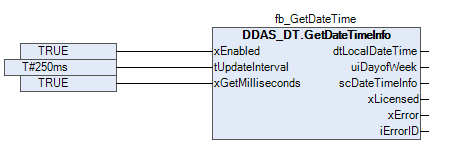
Function block sample input and output parameter:
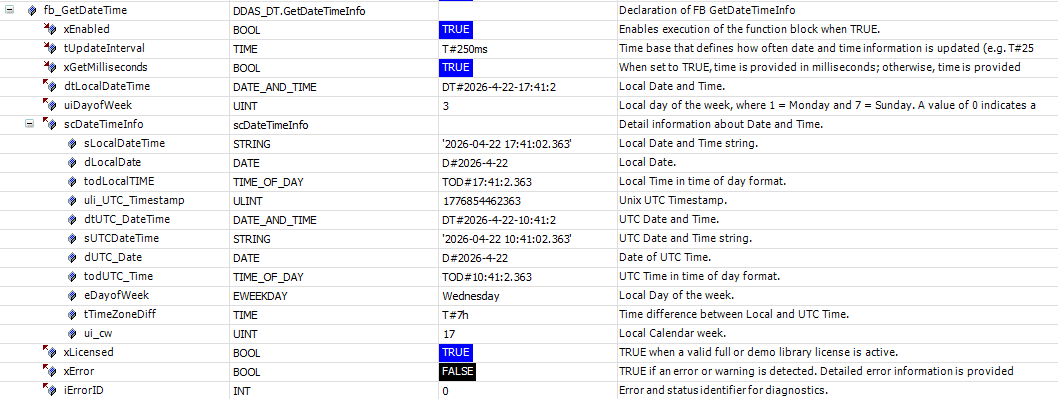
Screenshot example in Online / Monitor mode
Demo Visualisation
Your Feedback Matters
These instructions have been prepared to the best of our knowledge and belief to provide you with the highest possible level of support when working with our product.
Despite our best efforts, we may not always fully achieve this objective. If you identify any issues or have suggestions for improvement, we would greatly appreciate your feedback.
Please send your comments or criticism in a short e‑mail to:
Thank you for your support.
Your DDAS Application Software Team