License Manager Manual
About this documentation
This documentation provides essential information for working with components of the DDAS software ecosystem. It is intended for software developers and machine manufacturers who integrate, validate, and operate DDAS function blocks within CODESYS‑based applications.
This manual describes licensing of the DDAS Machine Insight Suite with DDAS activation keys.
Note!
Before installing or configuring any software, ensure that you have read and understood the operating instructions of all relevant hardware devices!
Tip!
Further information can be found at: https://www.ddas.digital
This manual is part of the DDAS library collection, which includes documentation for license management, date and time handling, scheduling, equipment performance, and other functional modules:
| Documentation | Subject |
|---|---|
| DDAS License Manager Manual | Licensing with DDAS activation keys (Machine Insight Suite) |
| DDAS Machine Insight Suite SL – Installation and Licensing | Licensing with a CODESYS device license (Machine Insight Suite SL) |
| DDAS Date Time Library Manual | Description and usage of the Date Time function blocks |
| DDAS Scheduler Library Manual | Description and usage of the Scheduler function blocks |
| DDAS Equipment Performance Library Manual | Description and usage of the Equipment Performance function blocks |
| DDAS Application Template Manual | Structure and usage of the Application Template |
Document history
| Version | Date | Author | Description |
|---|---|---|---|
| 1.0 | 28.09.2026 | DDAS | Initial version |
| 1.1 | 08.10.2026 | DDAS | Application Template: the switch xUseActivationKeys is removed; the template is delivered without site code. |
| 1.2 | 19.10.2026 | DDAS | Demo mode: 2 hours from each start of the application; an online change does not restart it |
| 1.3 | 20.10.2026 | DDAS | Licensing concept: the Machine Insight Suite is licensed with one bundle activation key; no activation keys for single libraries |
General
Library
The library DDAS_LicenseManager_Lib (namespace DDAS_LM) checks the license of all DDAS libraries. Each DDAS library references it; it is added to the project automatically and is delivered in compiled form only.
The library provides:
| Element | Kind | Purpose |
|---|---|---|
| GVL_License | global variable list | input: site code and activation keys |
| GetLicenseInfo | function | output: license status of a library or bundle |
| scLicenseInfo, scActivation | structures | data types of the interface |
| eLicenseSource, eError | enumerations | license source and error codes |
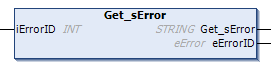
| Get_sError | function | error text for an error code |
To write to GVL_License or to call GetLicenseInfo, add DDAS_LicenseManager_Lib explicitly to the Library Manager of your application. The Application Template already contains this reference.
Licensing Concept
A license is based on three keys:
SiteCode – company identifier, chosen by the customer and registered with DDAS (see 2.3).
LibraryGuid – identifies the bundle or a library; delivered with the libraries.
LibraryActivationKey – issued by DDAS for exactly this SiteCode and LibraryGuid (for the Machine Insight Suite: the bundle GUID). Eight hexadecimal characters, for example EDB86DA0.
Bundle license
DDAS licenses the Machine Insight Suite as a bundle, in every edition. One activation key for the bundle GUID activates all libraries of the suite:
| License | LibraryGuid | Activation key |
|---|---|---|
| Machine Insight Suite (bundle) | {LIB-DDAS-MIS-BUNDLE-4A3D2F7D} | one key for all libraries of the suite |
The bundle covers the libraries included in the suite at the time of purchase. DDAS does not issue activation keys for single libraries of the suite. Each library still has its own GUID, as a constant in the library itself, for example DDAS_DT.GVL_LibGuide.cLibraryGuid; use it to query the license status of the library with GetLicenseInfo (chapter 4).
Site code
Choose a site code that identifies your company, for example ACME-Automation. DDAS checks that it is unique; general or sample values such as DDAS-Site-License are not accepted.
The site code is part of every activation key. It cannot be changed after the first key has been issued.
Enter the site code exactly as registered (up to 80 characters).
Other license source
Without activation data in GVL_License, the libraries use a CODESYS device license, if one is present on the device (Machine Insight Suite SL, see its installation and licensing documentation).
Licensing Process
Select the edition of the Machine Insight Suite.
Evaluate the libraries in the Application Template or in a test project in demo mode (2.4).
Request a quote, order the license and send your site code to DDAS.
DDAS checks the site code and sends the activation key for the bundle.
Enter the site code and the bundle key in GVL_License (chapter 3), or in GVL_Lib_Licensing when you use the Application Template (2.6).
Check the status with GetLicenseInfo (chapter 4). All function blocks of the suite now run without time limit.
Demo Mode
With a site code but without a valid activation key, a library runs with full functionality in demo mode:
2 hours from each start of the application. An online change does not restart the demo.
The demo starts with the first call of a DDAS function block or of GetLicenseInfo. The demo time only runs while DDAS function blocks or GetLicenseInfo are called.
A bundle entry starts one demo for the bundle and all its libraries.
After the demo has expired, the library stops and GetLicenseInfo reports error 30. Start the application again to start a new demo.
A valid activation key entered during the demo takes effect immediately.
Without a site code there is no demo with activation keys.
License Sources and Priority
The License Manager evaluates the sources in this order; the first one that applies is used:
| Priority | eSource | Condition | xFullLicense | xDemo |
|---|---|---|---|---|
| 1 | Key | valid activation key for the library or its bundle | TRUE | FALSE |
| 2 | Device | CODESYS device license on the device | TRUE | FALSE |
| 3 | KeyDemo | demo with site code running (2.4) | FALSE | TRUE |
| 4 | DeviceDemo | demo of the CODESYS device license running | FALSE | TRUE |
| 5 | None | no license | FALSE | FALSE |
xLicensed is TRUE for priorities 1 to 4.
Licensing in the Application Template
The Application Template contains the licensing part in the folder 08_Licensing. Enter your data only in GVL_Lib_Licensing:
| Variable | Content |
|---|---|
| sSiteCode | site code registered with DDAS; empty in the delivered template |
| sBundleKey | activation key of the Machine Insight Suite (bundle) |
| sLibraryActivationKey_DT, _SL, _EP | reserved, not used for the Machine Insight Suite; leave empty |
prgLicenseKeys passes these values to DDAS_LM.GVL_License; prgLicenseStatus reads the status of all libraries with GetLicenseInfo and passes licensing errors to MergeLibFBErrors. As long as no site code and no activation key are entered (state of delivery), prgLicenseKeys passes no activation data; only a CODESYS device license then applies. With a site code but without a key the demo mode starts (2.4). Details: Application Template Manual.
Screenshot: GVL_Lib_Licensing
GVL_License
General Information
Name: GVL_License (global variable list, access only qualified: DDAS_LM.GVL_License)
Library: DDAS_LicenseManager_Lib
CODESYS version compatibility: CODESYS V3.5.18.0 and higher
Purpose & Scope
GVL_License receives the activation data of the application: one site code and up to ten entries of LibraryGuid and activation key. The License Manager evaluates the entries; the status cannot be set directly.
Typical use cases
Activate the Machine Insight Suite with one bundle entry
Start the demo mode for evaluation (site code without key)
Interface Description
| Scope | Name | Type | Comment |
|---|---|---|---|
| Global | sSiteCode | STRING | Site code registered with DDAS |
| Global | aActivation | ARRAY[1..10] OF scActivation | Library or bundle GUID with activation key |
Structure scActivation
| Name | Type | Comment |
|---|---|---|
| sLibraryGuid | STRING | Library or bundle GUID |
| sActivationKey | STRING | Activation key, 8 hexadecimal characters |
The activation key is not case-sensitive; spaces and hyphens are ignored (edb8-6da0 equals EDB86DA0). Unused entries stay empty.
Execution & Timing Behaviour
The License Manager checks GVL_License for changes at most every 100 ms and then verifies the keys. The DDAS libraries query the result at most once per second. Write the entries once at start-up or cyclically; both work.
Assumptions & Limitations
One site code per application.
Up to ten entries. For the Machine Insight Suite one entry with the bundle GUID is sufficient; leave the other entries empty.
An entry with GUID but without site code produces error 11 for this GUID and, for a bundle, for all its libraries.
Example Implementation
Bundle license (Machine Insight Suite):
DDAS_LM.GVL_License.sSiteCode := 'ACME-Automation';
DDAS_LM.GVL_License.aActivation[1].sLibraryGuid := '{LIB-DDAS-MIS-BUNDLE-4A3D2F7D}';
DDAS_LM.GVL_License.aActivation[1].sActivationKey := 'EDB86DA0';
The activation key in this example is a placeholder and does not activate a license. To try the libraries without a key, use the demo mode (2.4).
Function GetLicenseInfo
General Information
Name: GetLicenseInfo (function)
Library: DDAS_LicenseManager_Lib
CODESYS version compatibility: CODESYS V3.5.18.0 and higher
Purpose & Scope
GetLicenseInfo returns the current license status of a library or of the bundle: whether the library may run, whether a full license or a demo is active, the remaining demo time, the license source and the last activation error.
Typical use cases
Show the license status in the visualization
Pass licensing errors to the error handling of the machine
Check the activation after entering new keys
Interface Description
| Scope | Name | Type | Comment |
|---|---|---|---|
| Input | sLibraryGuid | STRING | Library or bundle GUID, see GVL_LibGuide of the library |
| Return | GetLicenseInfo | scLicenseInfo | License status |
Structure scLicenseInfo
| Name | Type | Comment |
|---|---|---|
| xLicensed | BOOL | TRUE when the library may run (full license or demo) |
| xFullLicense | BOOL | TRUE for a full license |
| xDemo | BOOL | TRUE while a demo is running |
| tDemoTimeLeft | TIME | Remaining demo time (demo with site code) |
| eSource | eLicenseSource | Where the license comes from (2.5) |
| iErrorID | INT | Last activation error, see eError (0 = none) |
Enumeration eLicenseSource
| Name | Value | Comment |
|---|---|---|
| None | 0 | No valid license |
| Key | 1 | Full license by activation key |
| KeyDemo | 2 | Demo with site code |
| Device | 3 | CODESYS device license |
| DeviceDemo | 4 | Demo of the CODESYS device license |
Execution & Timing Behaviour
Call GetLicenseInfo cyclically in a task, for example once per cycle for each library of interest. The function returns the status evaluated by the License Manager (3.4); calling it more often does not change the result.
Error Handling & Diagnostics
iErrorID contains the last activation error of the GUID (chapter 5). A valid activation key clears the errors of its GUID. Use Get_sError for the error text.
Example Implementation
VAR
stInfoDT : DDAS_LM.scLicenseInfo;
sErrorDT : STRING;
END_VAR
stInfoDT := DDAS_LM.GetLicenseInfo(sLibraryGuid := DDAS_DT.GVL_LibGuide.cLibraryGuid);
IF stInfoDT.iErrorID <> 0 THEN
sErrorDT := DDAS_LM.Get_sError(iErrorID := stInfoDT.iErrorID);
END_IF
Screenshot: prgLicenseStatus of the Application Template online
Screenshot: visualization page Demo_Visu_LM with site code, bundle key and license status
Error Codes and Get_sError
Function Get_sError
Get_sError returns the error text and the enumeration value for an error code.
| Scope | Name | Type | Comment |
|---|---|---|---|
| Input | iErrorID | INT | Error and status identifier |
| Output | eErrorID | eError | Enumeration value for iErrorID |
| Return | Get_sError | STRING | Error text |
Each DDAS library has its own Get_sError for its own error codes, for example DDAS_DT.Get_sError. Use DDAS_LM.Get_sError for codes from GetLicenseInfo.
Enumeration eError
| Name | Value | Reported by GetLicenseInfo when |
|---|---|---|
| no_error | 0 | no error |
| empty_SiteCode | 11 | an entry has a GUID but sSiteCode is empty; applies to the GUID and, for a bundle, to all its libraries |
| invalid_Key_size | 20 | the key does not have 8 hexadecimal characters (after removing spaces and hyphens) |
| invalid_Key | 21 | the key has 8 hexadecimal characters but does not match site code and GUID |
| invalid_cLibraryGuid | 22 | GetLicenseInfo was called with an unknown GUID |
| demo_License_expired | 30 | the demo has expired and no other license applies; the application must be started again |
| unknowing_error | 99 | unknown error |
An empty activation key is the normal demo case and is not reported as an error. The values empty_Key (10) and empty_cLibraryGuid (12) are used internally only.
Error 10 of the function blocks: without a valid license, the function blocks of the DDAS libraries stop and report their own error 10 (no_ValidLicense). This is a code of the respective library (DDAS_DT.eError, DDAS_SL.eError, DDAS_EP.eError), not of the License Manager. Check the cause with GetLicenseInfo.
Troubleshooting
| Symptom | Cause | Action |
|---|---|---|
| Error 11 | activation entries without site code | enter the site code in GVL_License.sSiteCode (template: GVL_Lib_Licensing.sSiteCode) |
| Error 20 | key too short, too long or with invalid characters | check the key; only 0–9 and A–F, 8 characters |
| Error 21 | key does not match | check site code (exactly as registered) and GUID; bundle key belongs to the bundle GUID |
| Error 22 | unknown GUID in GetLicenseInfo | use the constant GVL_LibGuide.cLibraryGuid of the library |
| Error 30, function blocks report error 10 | demo expired | enter the activation key, or start the application again to continue the demo |
| Demo shorter than 2 hours or no demo, eSource = DeviceDemo or None | no site code entered; only the CODESYS device license and its demo apply | enter a site code |
If the problem remains, contact support@ddas.digital with the library versions, the site code and the output of GetLicenseInfo.
Your Feedback Matters
These instructions have been prepared to the best of our knowledge and belief to provide you with the highest possible level of support when working with our product.
Despite our best efforts, we may not always fully achieve this objective. If you identify any issues or have suggestions for improvement, we would greatly appreciate your feedback.
Please send your comments or criticism in a short e‑mail to:
Thank you for your support.
Your DDAS Application Software Team